SocialGo Review: Is This $799 WordPress Theme Worth It?

Build a branded community on your own WordPress site, with profiles, groups and messages already designed.

Want your own social network without renting space on someone else’s platform? This SocialGo review looks at a WordPress theme that promises exactly that.

Think about it. Your members, your posts and your rules all live on a platform you don’t control. One policy change and the reach you built can shrink overnight.

The usual escape route is expensive. You hire a developer, stitch together a stack of community plugins with separate yearly licences, and spend weeks fixing layouts that never quite match.

SocialGo takes a different angle: one premium WordPress theme plus 17 plugins, sold as a single package with an unlimited-site licence.

In this SocialGo review, I’ll explore what the software offers, how it works, and whether it’s worth your investment. Read on to find out if SocialGo fits your community plans.

This review contains affiliate links. If you buy through them, I may earn a commission at no extra cost to you.

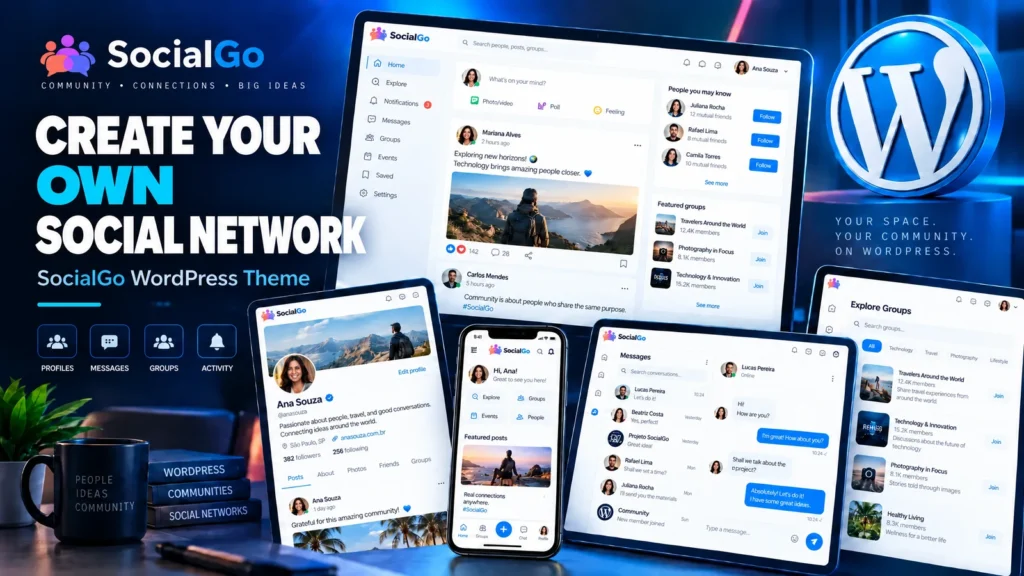
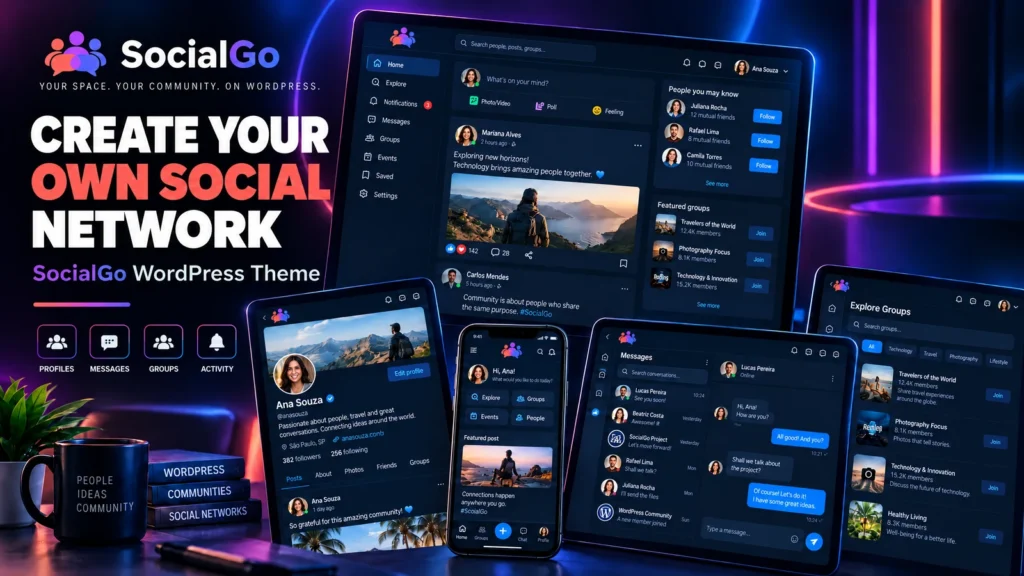
SocialGo is a premium WordPress theme with 17 bundled plugins that turns a standard WordPress install into a social network, so creators, schools, associations and businesses can run a community with profiles, feeds, groups and private messages on their own domain.

According to the vendor, it suits entrepreneurs, content creators, schools, associations and companies that want members to post, follow each other and gather around shared interests. Agencies can use the same licence to build community sites for clients.

What sets it apart is the bundle. Instead of buying a theme and then hunting for separate messaging, membership, security and speed plugins, you get them in one package built to work together. If you’re still comparing plugins in general, my guide to the best WordPress plugins for 2026 is a useful starting point.

Of course, SocialGo is not a hosted service. The vendor states clearly that hosting, a domain and the WordPress install are separate, and that you’ll still need to configure and customise the site.

SocialGo Review: Quick Overview

Owerview
Product CreatorRonaldo da Silva Alves
Product NameSocialGo
Launch Date2026-Nov-20
Launch Time9:00 AM ET
Front-end Price$799 (one-time payment)
Number of OTOsNone announced, single product
CouponNone announced
Official Website>>>Visit The FE Salespage<<<
BonusYes, Huge Bonuses
GuaranteePer Payment Platform Policy (Typically 7 Days)
NicheWordPress Theme, Online Community
Vendor’s Supportsuporte@socialgo.site
Claim My Bonusesbonus.samxavier@gmail.com
RecommendWorth considering for agencies and community builders

Above is the Complete Overview of SocialGo and I mentioned the creator’s name, the launch date of the product, and the Front End price details.

About the Creator: Ronaldo da Silva Alves

The JVZoo product listing names Ronaldo da Silva Alves as the seller behind SocialGo. His JVZoo seller account dates from February 2024, and the listing shows a small sales history so far.

The vendor’s pages don’t list previous product launches or a company name, so I can’t point you to a track record. What I can confirm is a dedicated support channel: an email address (suporte@socialgo.site) and a customer portal at suporte.socialgo.site, where buyers download the files and documentation.

Here’s why that matters. With a self-hosted theme, support and updates are what keep your site working as WordPress changes. The vendor promises 5 years of free updates, so the support portal is the part I’d watch most closely after launch.

Profiles, Groups and Paywalls on Your Own Domain: What SocialGo Can Do

Here’s every feature the vendor lists, grouped the way the sales page presents them.

SocialGo Theme: A Ready-Made Social Layout

Tired of starting with a blank blog theme and trying to make it look like a community? The SocialGo theme ships with the main social pages already structured: profiles, feeds, groups and messages.

The vendor describes it as a premium design and a solid starting point, not a finished site. You still shape the content, menus and branding to fit your community.

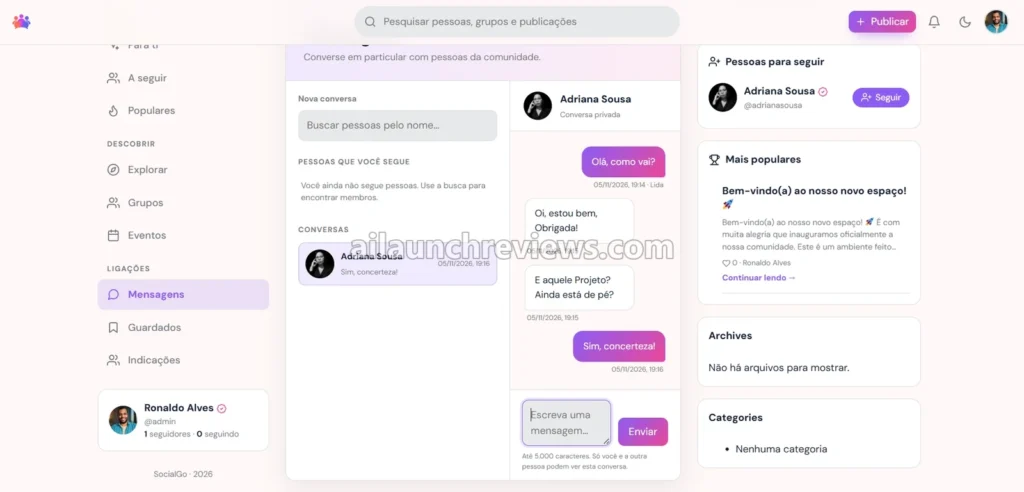
SocialGo Messages: Private Conversations Inside Your Network

Want members to talk without moving the conversation to another app? The SocialGo Messages plugin adds direct messaging inside your network.

Even better, conversations stay on your site, next to the profiles and groups where they started. That keeps members inside your community instead of sending them elsewhere.

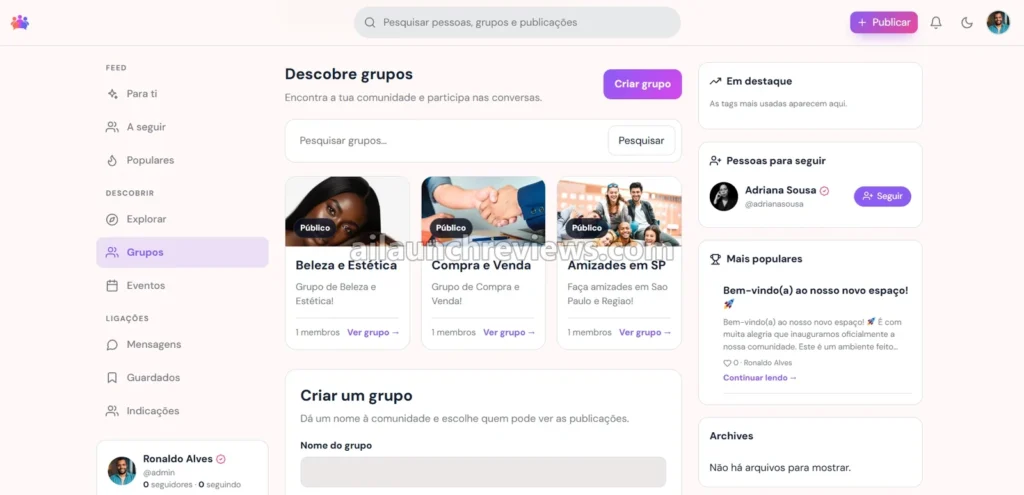
Groups: Spaces Built Around Shared Interests

Groups let members gather around a topic, a class or a local chapter. According to the vendor, this is one of the core engagement tools, alongside messages and events.

For schools and associations, groups are often the feature that makes a community feel organised instead of one noisy feed.

Events: Bring Members Together on a Schedule

Running live calls, meetups or classes? The Events plugin is part of what the vendor calls its engagement set.

Instead of posting event details in a feed where they get buried, you give them their own place in the network.

Explore: Help Members Discover People and Content

New members need a way to find people worth following. The Explore system is the discovery part of the bundle, so members can browse beyond their own feed.

What I like here is that discovery is included from day one. Small communities often stall because new members don’t know where to start.

Member Access and Login Gate: Put Content Behind a Paywall

Forget bolting a separate membership system onto your site. The vendor groups Restricted Access, the Login Gate paywall and a referral system under “VIP Member Management”.

The comparison table on the sales page says SocialGo includes subscription and referral modules, so you can reserve parts of the network for paying or approved members.

Referrals: Let Members Bring in New Members

Word of mouth is how most communities grow. The Referrals plugin gives members a structured way to invite others.

Of course, a referral tool won’t bring in members on its own. You still need a reason for people to join and share.

Accounts, Login Screen and Background Studio: Branding Without Code

Want the sign-in page to look like your brand instead of default WordPress? The vendor says the custom login screens, media management and background tools work “without touching a single line of code.”

The Accounts and Login Screen plugins cover sign-up and sign-in, while Media Manager and Background Studio handle the visual side.

WebP Optimizer, Cache Cleaner and Responsive: Speed on Every Screen

Social sites are image heavy, and slow pages drive members away. The vendor lists real-time WebP image optimisation, cache cleaning and a responsive design under “Elite Performance”.

Even better, these come in the same package, so you’re not mixing a theme with three performance plugins from different developers.

Network Shield and SEO Suite: Security and Search Basics

An open community attracts spam and bots. Network Shield is the bundle’s security plugin, and SEO Suite handles search settings.

The vendor’s pages name these plugins but don’t publish a detailed feature list for each one before purchase, so treat them as basics rather than replacements for dedicated security services.

Premium Language Control: Translate Without Breaking Routes

Running a community in more than one language? According to the vendor, Premium Language Control lets the admin manage translations for the theme and plugins while keeping routes, slugs and member content intact.

This matters here because the vendor’s own demo screenshots show a Portuguese interface. Language control is how you present the network in your members’ language.

Unlimited License: As Many Sites as You Want

Not sure how many communities you’ll build? The vendor’s FAQ says you can use SocialGo on personal projects, for clients, or on as many sites as you wish.

The vendor contrasts this with competing community plugins that often license one site at a time. If you run an agency, this is the line that changes the maths.

Lifetime Access and 5 Years of Free Updates

The vendor says you buy once and use the base theme and plugins forever, with no monthly fees or mandatory renewals. Free updates run for 5 years, including compatibility with new WordPress versions.

Email Support for Setup Questions

Support covers installation, configuration and use of the included tools, by email at suporte@socialgo.site. Premium technical support for advanced customisation is optional and sold separately.

Ready to try it? Grab SocialGo through the button below.

SocialGo in Action: A Complete Step-by-Step Software Walkthrough

For this walkthrough, picture a small photography club that wants its own members-only network instead of a Facebook group. The steps follow the vendor’s four-stage setup (buy, access the portal, install on WordPress, customise) and the vendor’s demo screenshots.

Phase 1: Buy and Download

Step 1: Buy the Package

Click Buy Now on the sales page and complete checkout. There’s one product, the SocialGo Theme Unlimited License.

Step 2: Check Your Email

According to the vendor, access details arrive by email after purchase.

Step 3: Log In to the Support Portal

Open the customer portal at suporte.socialgo.site with the details from that email.

Step 4: Download the Theme and Plugins

Download the theme and the 17 plugin files from the portal, along with the documentation, which the vendor releases only to licensed customers.

Phase 2: Install on WordPress

Step 5: Set Up Hosting and a Domain

SocialGo doesn’t include either, so pick a host that can handle an image-heavy community site. My web hosting reviews guide walks through how to choose one.

Step 6: Install WordPress

Install a fresh copy of WordPress. The vendor says SocialGo is compatible with WordPress 7.1.4 or earlier versions.

Step 7: Upload and Activate the Theme

Upload the SocialGo theme through your WordPress dashboard and activate it, following the vendor’s documentation.

Step 8: Install the 17 Plugins

Add the bundled plugins, from SocialGo Messages and Groups to WebP Optimizer and Network Shield.

Phase 3: Configure Your Network

Step 9: Set Your Language

Use Premium Language Control to choose how the theme and plugins appear to members, since the demo interface is in Portuguese.

Step 10: Decide What’s Public and What’s Private

Set up Member Access and Login Gate so club resources sit behind a login or a paid membership.

Step 11: Brand the Login Screen

Use Login Screen and Background Studio to add the club’s logo, colours and background images.

Step 12: Turn On Speed and Security Tools

Enable WebP Optimizer and Cache Cleaner for faster pages, then set up Network Shield and SEO Suite.

Phase 4: Tour the Member Experience

Step 13: Post to the Community Feed

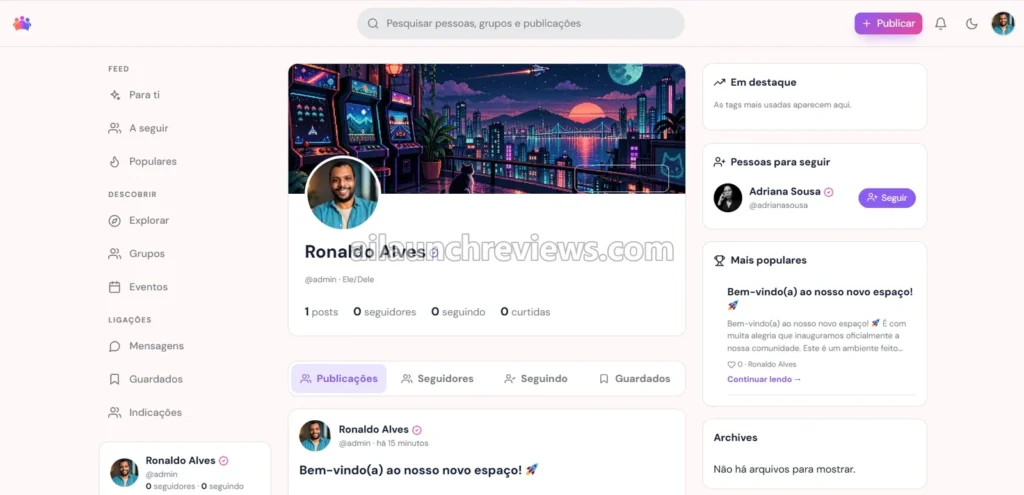
Publish a welcome post. The feed is where members see posts and activity in one shared space.

Step 14: Check a Member Profile

Open a profile to see how members appear to each other, with their posts, followers and following counts.

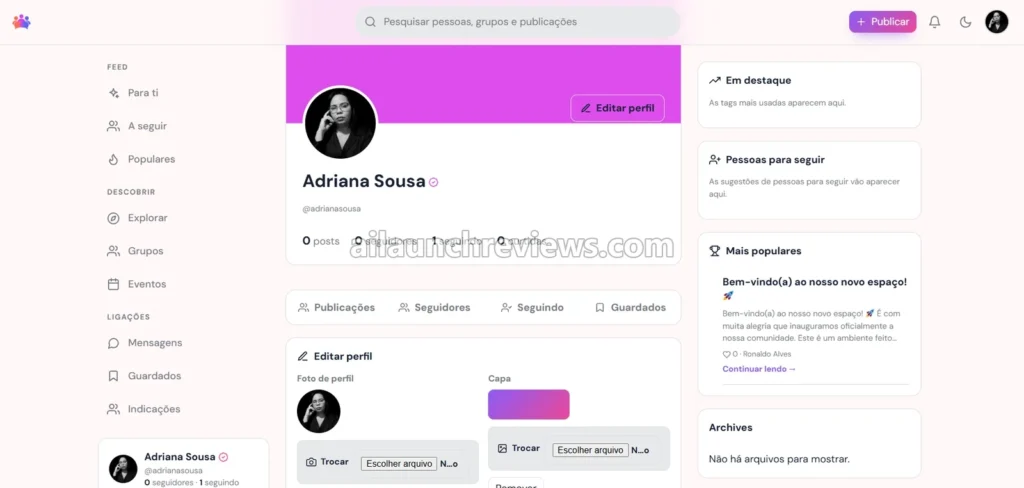
Step 15: Edit Your Profile

Change the profile photo and cover image from the profile editing panel. The vendor’s screenshot shows the panel labelled “Editar perfil” in the Portuguese demo.

Step 16: Create Your First Group

Set up a group for each club interest, such as landscapes or portraits, so members can join the ones they care about.

Step 17: Send a Direct Message

Message a member privately to confirm conversations work inside the network.

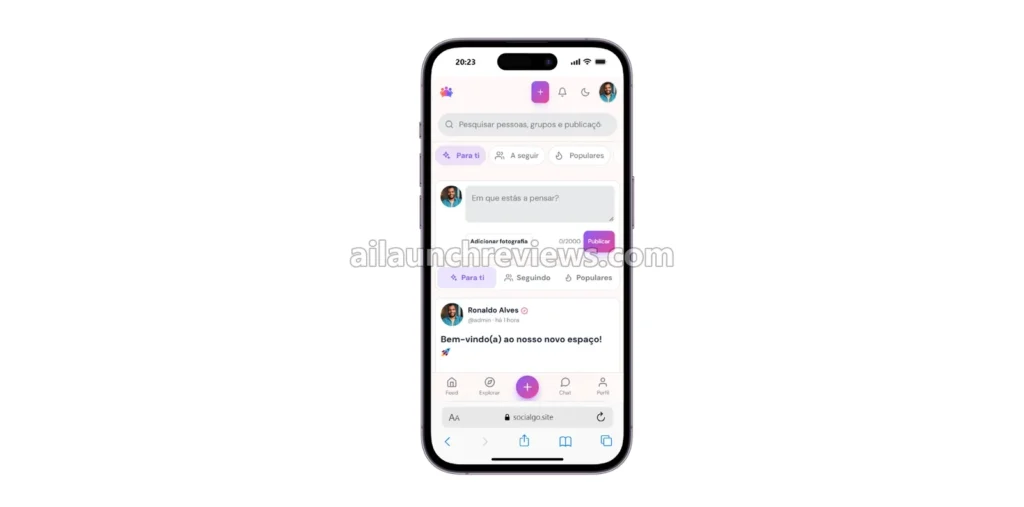
Step 18: Test the Mobile View

Open the site on your phone. The vendor shows a responsive community view built for smaller screens.

Step 19: Invite Your First Members

Share your signup link, or turn on Referrals so early members can invite others.

Why Should You Consider Using SocialGo?

Here are 3 reasons why I believe SocialGo could be a valuable addition to your community plans:

You Own the Platform and the Member List

Building on a social platform means renting your audience. SocialGo runs on your own WordPress site, so the domain, the content and the member accounts are yours. What I like here is that you can add a paywall later through Member Access and Login Gate without moving to a new platform.

One Licence Covers Every Site You Build

Many community plugins charge per site, every year. The vendor’s comparison table claims rivals cost $250 or more a year for one site, against $799 once for unlimited sites with SocialGo. Those competitor figures are the vendor’s own estimates, but the unlimited licence itself is clearly stated.

The Pieces Are Designed to Work Together

Mixing a theme with plugins from five developers is where most community sites break. SocialGo bundles 17 plugins with one theme, covering engagement, access, speed, security and design. What I like here is that one support address covers the whole stack.

Who Is SocialGo Best For?

SocialGo is a great fit for:

  • Content creators and coaches: a members’ space you control, with groups and private messages.
  • Schools and course creators: class groups, events and restricted resources on one site.
  • Associations and clubs: a private network for members instead of a public social media group.
  • Companies: an internal or customer community with your own branding.
  • Web agencies and freelancers: the unlimited licence covers client projects.
  • WordPress educators: a complete community stack to teach, demo and set up for students.
  • Niche community builders: a home for a hobby, profession or local audience.

It may not suit:

  • Beginners with no WordPress experience: the vendor says you need basic installation and configuration knowledge, or someone to help.
  • People who want a hosted, no-setup app: you supply hosting, a domain and WordPress yourself.
  • Anyone testing a small idea on a tight budget: $799 is a big upfront spend before you have members.

SocialGo Pricing Breakdown: Front-End, OTOs and Coupon

Front-End Price

SocialGo is available for $799 (one-time payment), with no monthly subscription required.

Let’s see exactly what’s included in this package: the SocialGo theme in its latest version, the 17 premium plugins, an unlimited-site licence, lifetime access to the base theme and plugins, 5 years of free updates, and email support for setup questions.

Compare that with the old way. A developer-built community site or a stack of separate yearly plugin licences adds up fast, and every client site multiplies the cost. With one licence for unlimited sites, the price makes most sense for agencies or anyone planning more than one community.

The sales page shows a crossed-out $2,199 price next to the $799 offer, and the pre-launch page says the price will move to a standard price after a launch-week early-bird window. Neither page gives an end date or the standard price, so I can’t tell you when or by how much it changes.

There’s a full guarantee under the payment platform’s policy. The vendor says the refund period is set by each platform, typically 7 days after purchase. Check the terms at checkout before you buy.

No coupon code has been announced for this launch.

Click the button below to access the main sales page:

SocialGo OTO Breakdown

The vendor’s pages list a single product and no OTOs, upsells or downsells. The only paid extra mentioned is optional premium technical support for expansion, advanced customisation and on-demand work, which is quoted on request with no published price.

That keeps the maths simple: the front-end price of $799 is the full cost of the software package. Hosting, a domain and any premium support are extra.

Which Plan Should You Pick?

There’s only one plan, so the real question is whether you need premium support. If you’re comfortable installing a WordPress theme and plugins, the base package and free email support should cover setup. If you want custom features or someone to build the site for you, ask the vendor for a premium support quote before you commit.

SocialGo Bonuses

According to the sales page, SocialGo comes with 1 vendor bonus:

SocialGo Premium Language Control (Value $97): an admin tool for managing translations across the theme and plugins while keeping routes, slugs and member content intact.

The sales page calls it an exclusive upgrade for selected members, and the pre-launch page says it’s free on launch day for members of the vendor’s VIP group. It also appears in the list of 17 plugins, so confirm it’s included in your order at checkout.

You’ll also find my own bonus package at the end of this review.

Can You Really Make Money With SocialGo?

Yes, but the software won’t bring you customers or guarantee income on its own. The vendor’s FAQ allows use on client projects and unlimited sites, so these methods fit the licence.

Build Community Sites for Clients

Coaches, schools and associations want their own networks but don’t want to build them. You install SocialGo on the client’s hosting, brand it and hand it over. Price it as a fixed project based on the setup and design work involved. Expect real effort per client, because every site needs configuration and content.

Offer Setup, Maintenance and Support Retainers

Once a community is live, someone has to keep WordPress, the theme and the plugins updated. You can charge a monthly fee for updates, backups and member support. The 5 years of free updates cover the software, but not the time it takes to apply and test them.

Run Your Own Paid Membership Community

If you have expertise or an audience, you can use Member Access and Login Gate to charge for entry to your own network. Set the price based on what members get: courses, events or direct access to you. This takes the longest to pay off, because you need to attract and keep members.

Launch Niche Communities With Referrals

Pick a hobby or profession that lacks a good home online, build a network around it and use the Referrals plugin to grow it. Revenue can come from memberships or sponsors once the community is active. Of course, growing a community from zero takes months of steady posting and moderation.

What I Love About SocialGo (And What I'd Improve)

PROS

  • Unlimited-Site Licence: one purchase covers personal and client sites with no per-site fees.
  • One-Time Price: no monthly subscription for the base theme and plugins.
  • 17 Plugins Included: messaging, groups, events, access, media, security and speed come in one bundle.
  • Built-In Paywall Tools: Member Access and Login Gate let you restrict content without a separate membership system.
  • Referral System: members can invite others through a dedicated plugin.
  • Language Control: admins manage translations without breaking routes or slugs, according to the vendor.
  • Performance Tools: WebP optimisation, cache cleaning and responsive layouts are part of the package.
  • 5 Years of Updates: free updates include compatibility with new WordPress versions.
  • Branding Without Code: login screens, media and backgrounds can be customised without coding, per the vendor.
  • Self-Hosted Ownership: your members, content and domain stay under your control.

CONS

  • Hosting and Setup Not Included: you pay separately for hosting and a domain and need basic WordPress skills to install everything.
  • Short Refund Window: the vendor defers to the payment platform’s policy, typically 7 days, which isn’t long to test a full community site.
  • Thin Plugin Details Before Purchase: the sales page names the 17 plugins but describes them only by category, and the documentation is released only to buyers.
  • Premium Support Has No Published Price: advanced customisation is quoted on request, so you can’t budget for it upfront.
  • Demo Screenshots Are in Portuguese: the vendor’s demo interface isn’t in English, so plan time to set up the language you need.
  • New Seller With Little History: the vendor’s pages list no previous launches, and the JVZoo listing shows a small sales history.

SocialGo FAQ

1. Do I need to know how to code to use SocialGo?

No. The vendor says no advanced programming is needed, but you do need basic WordPress installation and configuration knowledge, or someone who can help.

2. Is SocialGo cloud-based or installed?

No, it isn’t a cloud app. SocialGo is a WordPress theme and plugin bundle that you install on your own hosting.

3. Does SocialGo include hosting and a domain?

No. The vendor states that hosting, a domain and the WordPress install are separate requirements.

4. Do I need to buy any OTOs?

No. The vendor’s pages list no OTOs. The only extra is optional premium technical support, quoted on request.

5. Can I build social networks for clients?

Yes. The vendor’s FAQ says the Unlimited License covers personal projects, client work and as many sites as you wish.

6. Are there monthly fees or API costs?

Not necessarily. The vendor says there are no monthly fees for the base theme and plugins and doesn’t mention any required API keys, but you’ll pay for hosting and a domain.

7. Are updates included?

Yes. Updates are free for 5 years, according to the vendor, including compatibility with new WordPress versions.

8. Does SocialGo work on mobile devices?

Yes. The vendor describes the theme as responsive, with a community view built for smaller screens.

9. Is support included?

Yes. Email support is included at suporte@socialgo.site for installation, configuration and use of the included tools. Premium technical support is a separate purchase.

10. Is there a refund policy?

Yes. The vendor offers a full guarantee under the payment platform’s policy, with a refund period that is typically 7 days after purchase.

My Final Verdict on SocialGo

Overall, I believe SocialGo is worth considering, especially if you want a self-hosted social network on WordPress and plan to build more than one. This SocialGo review found a clear offer: one $799 payment for a theme, 17 plugins, unlimited sites and 5 years of updates.

There’s only one tier, so the choice is about fit. Agencies and anyone launching several communities get the most from the unlimited licence. A single creator testing one idea should weigh the upfront price and the setup work first.

The honest caveat: this review is based on the vendor’s sales pages, demo screenshots and FAQ, not hands-on testing. Plugin details are thin until you buy and the refund window is short, so read the checkout terms carefully.

GENERAL BONUS

CLAIM YOUR EXCLUSIVE BONUSES IN 3 SIMPLE STEPS

Step 1: Purchase the SocialGo directly from my website.

Step 2: Once your purchase is complete, forward your receipt to: bonus.samxavier@gmail.com

Step 3 (Final): Sit back and relax! You’ll receive all your bonuses within 24 hours, guaranteed.

Thanks for reading my SocialGo Review. Wishing you and your family continued success and prosperity!

Author

  • Sam

    I’m Sam, an SEO, digital marketing, and affiliate marketing specialist. Through ailaunchreviews.com, I promote and review AI tools, plugins, themes, and software, helping beginners choose high-quality, efficient products that deliver real value, productivity, and trustworthy results.

Leave a Comment