Video Traffic Engine Review: 30 Days of Book Videos

Turn one book or Etsy listing into a month of short videos, with the hooks, scripts and captions already written.

Who is sending readers to your book today? If the honest answer is “nobody”, this Video Traffic Engine review is for you.

Think about it. Your book is live, your listing is live, and the page is quiet. You published the hard part, and now you’re waiting for visitors who never show up.

The usual fixes cost money or time. Ads can eat a month of royalties in a week, and building a following on TikTok or Reels means posting every day without knowing what to say.

Video Traffic Engine takes a narrow angle: it plans 30 days of short videos around one product, so you always know what to post next.

In this Video Traffic Engine review, I’ll explore what the software offers, how it works, and whether it’s worth your investment. Read on to find out if it fits your publishing goals.

This review contains affiliate links. If you buy through them, I may earn a commission at no extra cost to you.

Video Traffic Engine is a browser-based content planner that turns one KDP book or Etsy printable listing into a 30-day calendar of short videos, so authors and sellers can post on TikTok, Instagram Reels and YouTube Shorts without ads, a following or showing their face.

You enter your listing details once. The app gives you a daily pack for every day of the month: a hook with test variations, a voiceover script, on-screen text, a shot list, a caption with hashtags, and paste-ready prompts for AI video, image and voice tools.

What sets it apart is the focus. It isn’t a general social media scheduler. It’s built for low-content and puzzle books, children’s books, journals and Etsy printables, and every script points viewers back to your listing. If you want a wider view of the tools for running social accounts, see my guide to the best social media marketing tools.

Of course, the app writes the plan and the words. You still make and post the videos.

Video Traffic Engine Review: Quick Overview

Owerview
Product CreatorGeet Verma
Product NameVideo Traffic Engine
Launch Date2026-Nov-20
Launch Time8:00 AM EST
Front-end Price$14 (one-time payment)
Number of OTOs4 upgrades, $27 to $67
CouponNone announced
Official Website>>>Visit The FE Salespage<<<
BonusYes, Huge Bonuses
Guarantee14 Day Money Back Guarantee
NicheShort Video Marketing, KDP and Etsy
Vendor’s Supportgeet@geetsoft.com
Claim My Bonusesbonus.samxavier@gmail.com
RecommendWorth considering for KDP authors and Etsy sellers

Above is the Complete Overview of Video Traffic Engine and I mentioned the creator’s name, the launch date of the product, and the Front End price details.

About the Creator: Geet Verma

Video Traffic Engine comes from Geet Verma, who answers support questions directly by email at geet@geetsoft.com and has a public Facebook profile.

The vendor’s pages don’t list previous launches or say how long Geet has been selling software, so I can’t point you to a track record.

What I can confirm is how the pages handle claims. The sales page carries a privacy policy, an income and earnings disclaimer, and plain notes that the product doesn’t guarantee views, traffic or sales, that AI tools may cost extra, and that some platforms ask creators to label AI-generated content. That’s more candour than most launches at this price.

One Listing In, a Month of Videos Out: What Video Traffic Engine Can Do

Here are the tools the vendor lists inside the front end.

30-Day Video Traffic Pipeline: From Listing to Posting Plan

Forget planning each video the night before. The pipeline runs in three steps: enter the listing, approve the month, and post.

The app reads your topic, audience and angle from one form, then builds the whole month around it. Even better, you set it up once and work from the same plan for 30 days.

Video Traffic Engine pipeline illustration turning one book into a month of short videos

Daily Video Packs: Everything You Need for Each Day

Open any day and you get a complete pack. According to the vendor, each one includes a 3-second hook with 3 variations, a 15 to 30 second voiceover script, on-screen text and a shot list, a caption with hashtags and a call to action, an AI video prompt, an AI image prompt, a voiceover prompt and a format tag.

That’s the part that kills the blank-page problem. Instead of deciding what to say, you pick up the pack and work through it.

Video Traffic Engine daily video pack illustration with hook, script, caption and video icons

Hook Lab: 20 Hooks Sorted by Angle

The first line decides whether people keep watching. Hook Lab gives you 20 hooks per product, sorted by curiosity, problem, gift, kids and family, and seasonal angles.

You copy any hook with one click. The vendor suggests testing a few each week and keeping the ones that work.

Daily Scripts: Voiceover, On-Screen Text and Shot Lists

Not sure what to say on camera, or what to show? Each day comes with a voiceover script written to be read aloud, plus on-screen text and a shot list that uses what you already have: your cover, your pages and screen recordings.

The voiceover prompt is formatted for AI voice tools, with tone and pacing notes. If you’d rather not record your own voice, my guide to AI voice generators and audio tools covers the options.

AI Video Prompts: Make a Video Without Filming

Don’t want to film at all? Each day includes paste-ready prompts for video, image and voiceover tools, so you can make the clip in a separate AI tool.

The vendor offers three routes and lets you mix them: faceless and AI-made, phone-filmed with your book in hand, or a hybrid of a flip-through clip and an AI-made intro or background. For help choosing an AI video tool, see my AI video software guide.

Video Traffic Engine illustration of three ways to make videos: AI-made, phone-filmed and hybrid

30-Day Calendar: Five Formats Keep the Month Varied

Worried your videos will all look the same? Every day has a format: trailer, flip-through, tip, story or review request.

The calendar rotates them across the month, so your feed stays varied and you never have a day without a plan.

Three Platforms, One Set of Scripts

Short video is where free discovery happens on TikTok, Instagram Reels and YouTube Shorts. The same scripts work on all three, so every video you make can be posted three times.

Platform notes tell you what to tweak for each one. What I like here is that you’re not writing three versions of the same idea.

Video Traffic Engine illustration of one video posted on TikTok, Reels and Shorts

Listing X-Ray: Know What to Show

Found gaps in your listing details? Listing X-Ray scores how ready your title, topic, audience and benefit are, and points out five things to show in every video.

It spots missing details before you start posting, which matters because every script is built from those details.

Reuse Engine: Turn Scripts Into Posts for Other Platforms

Want more from each script? The Reuse Engine turns every script into a caption and a post for other platforms, so one day’s work can feed more than one channel.

Copy, Download and Print Your Plan

You don’t have to work inside the app. The vendor’s screenshots show buttons to Copy all 30 days, Copy 30-day AI prompt, Download .txt and Print plan.

That makes it easy to keep a backup or hand the plan to a helper.

Video Traffic Engine app shown on a laptop with the 30-day calendar and daily packs

Browser-Based App: Nothing to Install

According to the vendor, the app runs in the browser with nothing to install. You can start from a new social account, with no following needed.

Quick-Start Guide and Video Walkthrough

The front end includes a quick-start guide to get from sign-in to your first video, and a video walkthrough of the whole process.

Ready to try it? Grab Video Traffic Engine through the button below.

Video Traffic Engine in Action: A Complete Step-by-Step Software Walkthrough

For this walkthrough, I’ll use the vendor’s own example: a large-print puzzle book called “Sunny Days Sudoku for Seniors”. The steps follow the vendor’s real app screenshots and descriptions.

Phase 1: Tell the App About Your Product

Step 1: Open the Quick-Start Guide

Sign in and click Quick-start guide in the top bar if you want a short tour first. Start over sits next to it if you ever need a clean slate.

Step 2: Try an Example (Optional)

Press Try an example to see a finished month in seconds before you enter your own book.

Step 3: Choose Your Product Type

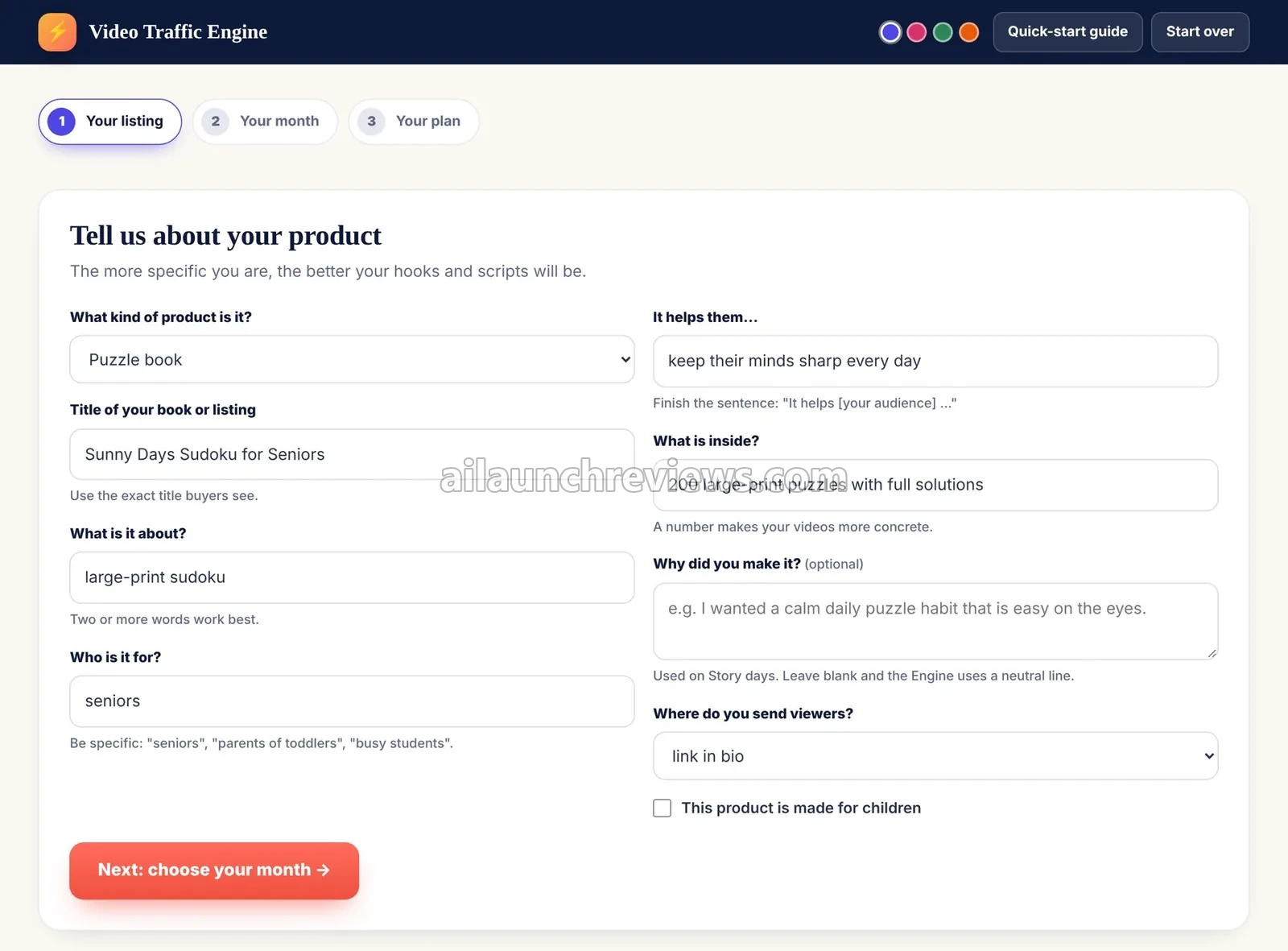
On the Your listing step, pick the product type under “What kind of product is it?”, such as Puzzle book.

Step 4: Enter the Title

Type the exact title buyers see, then add what the product is about in two or more words.

Step 5: Describe the Audience and Benefit

Fill in who it’s for (be specific, like “seniors”) and finish the sentence “It helps them…”, for example “keep their minds sharp every day”.

Step 6: Add What’s Inside and Why You Made It

Add a concrete number, such as “200 large-print puzzles with full solutions”. The optional “Why did you make it?” line is used on Story days.

Step 7: Choose Where You Send Viewers

Pick where viewers go, such as link in bio, and tick the box if the product is made for children. Then click Next: choose your month.

Video Traffic Engine listing form with product type, title, audience and benefit fields

Phase 2: Approve Your Month

Step 8: Pick Your Video Styles

On the Your month step, choose the video styles you like. According to the vendor, this shapes the mix of trailers, tips, flip-throughs and stories.

Step 9: Approve the 30-Day Calendar

Review the month and approve it. The app then opens Your plan with all 30 days filled in.

Phase 3: Work Through Your Plan

Step 10: Open a Day From the Calendar

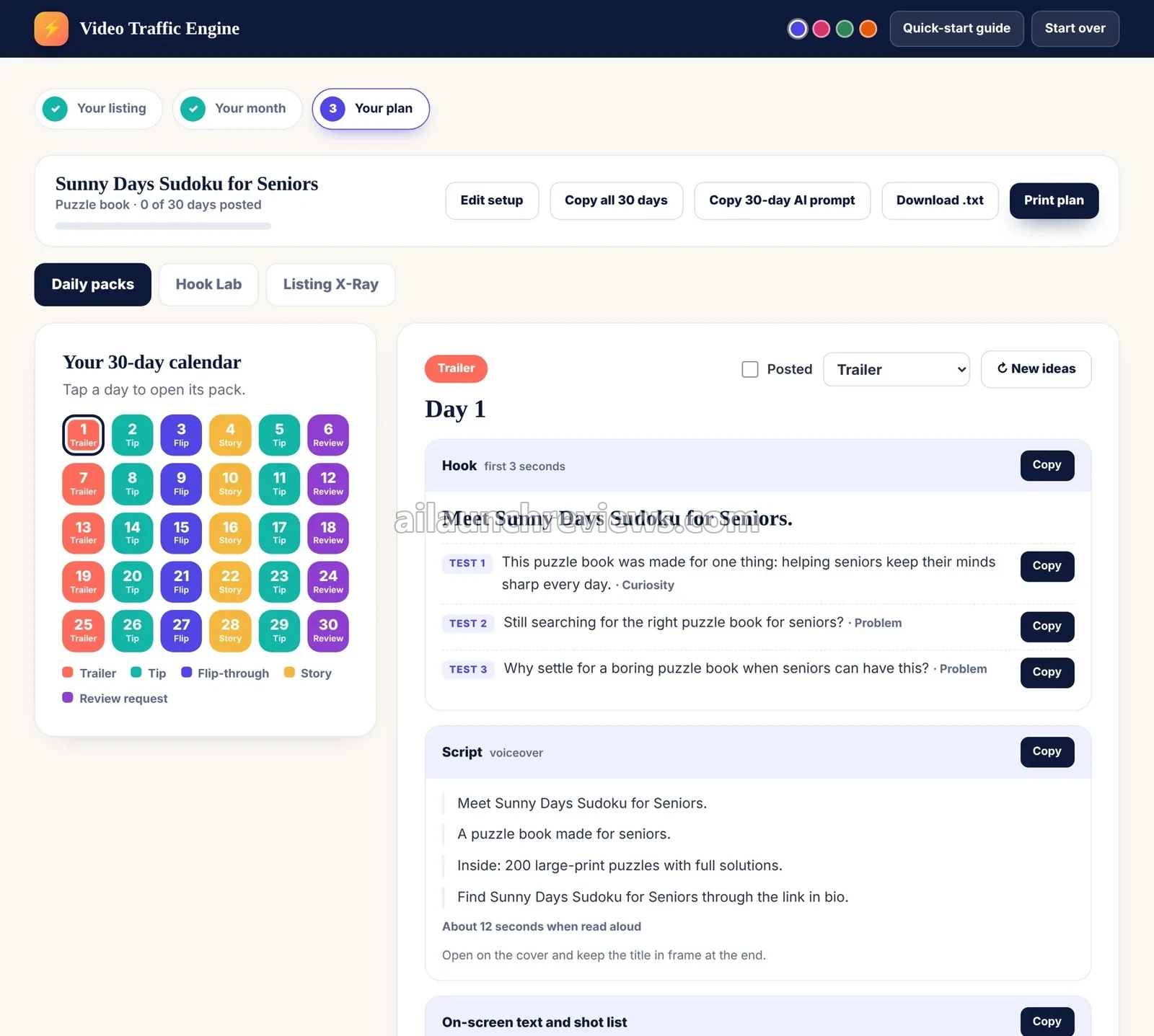
Under Daily packs, tap any day in the 30-day calendar. Day 1 in the vendor’s example is a Trailer.

Video Traffic Engine 30-day calendar and Day 1 trailer pack with hook tests and voiceover script

Step 11: Pick a Hook to Test

Each hook comes with three test lines tagged by angle, such as Curiosity or Problem. Click Copy on the one you want.

Step 12: Copy the Script and Shot List

Copy the voiceover script and read the shot note, such as “open on the cover and keep the title in frame at the end”.

Step 13: Swap the Format or Get New Ideas

Use the format dropdown to change a day’s format, or click New ideas for a fresh take. Tick Posted once the video is live.

Step 14: Browse the Hook Lab

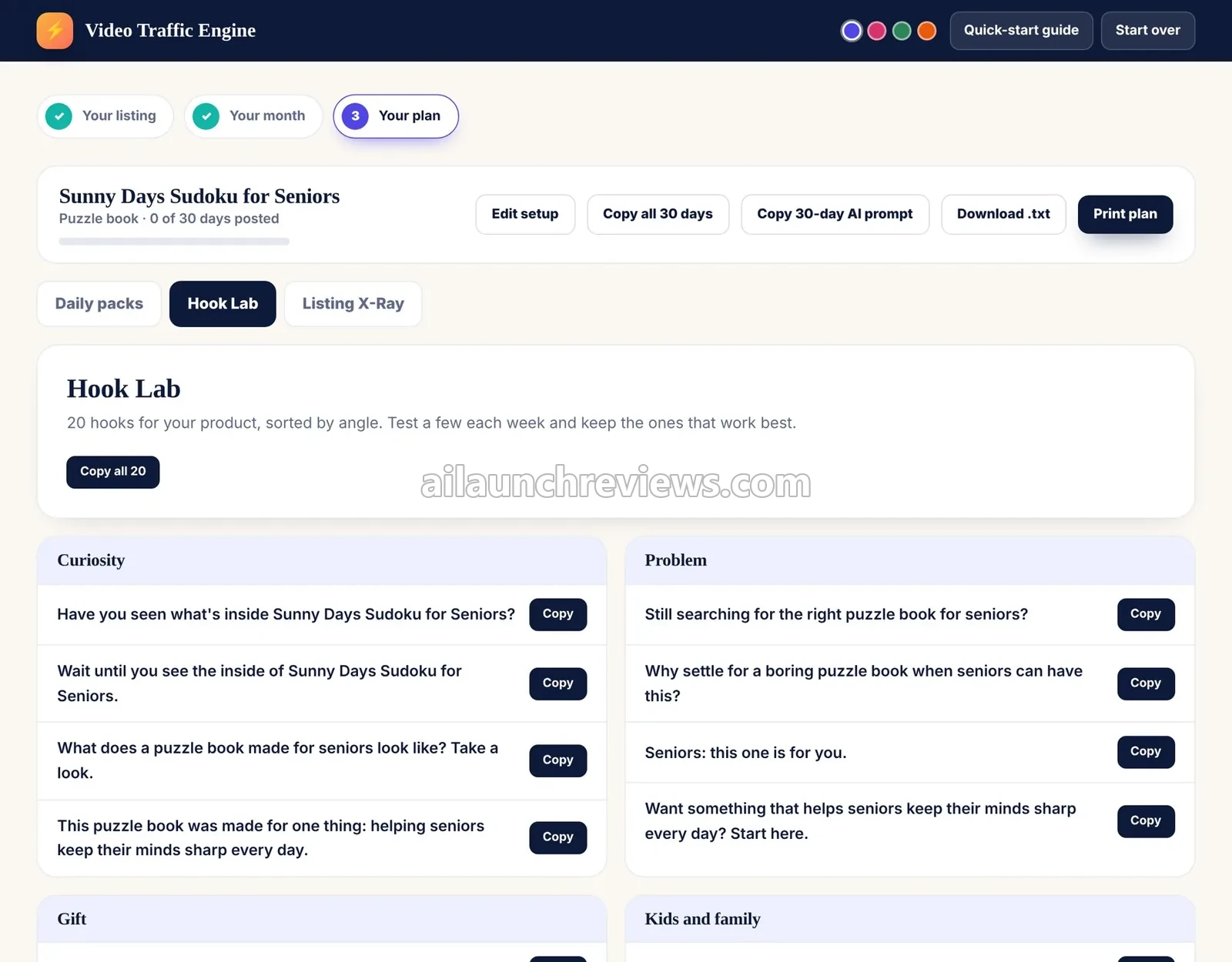
Switch to the Hook Lab tab to see all 20 hooks sorted by angle, and copy any of them for extra tests.

Video Traffic Engine Hook Lab tab with hooks sorted by curiosity and problem angles

Step 15: Check the Listing X-Ray

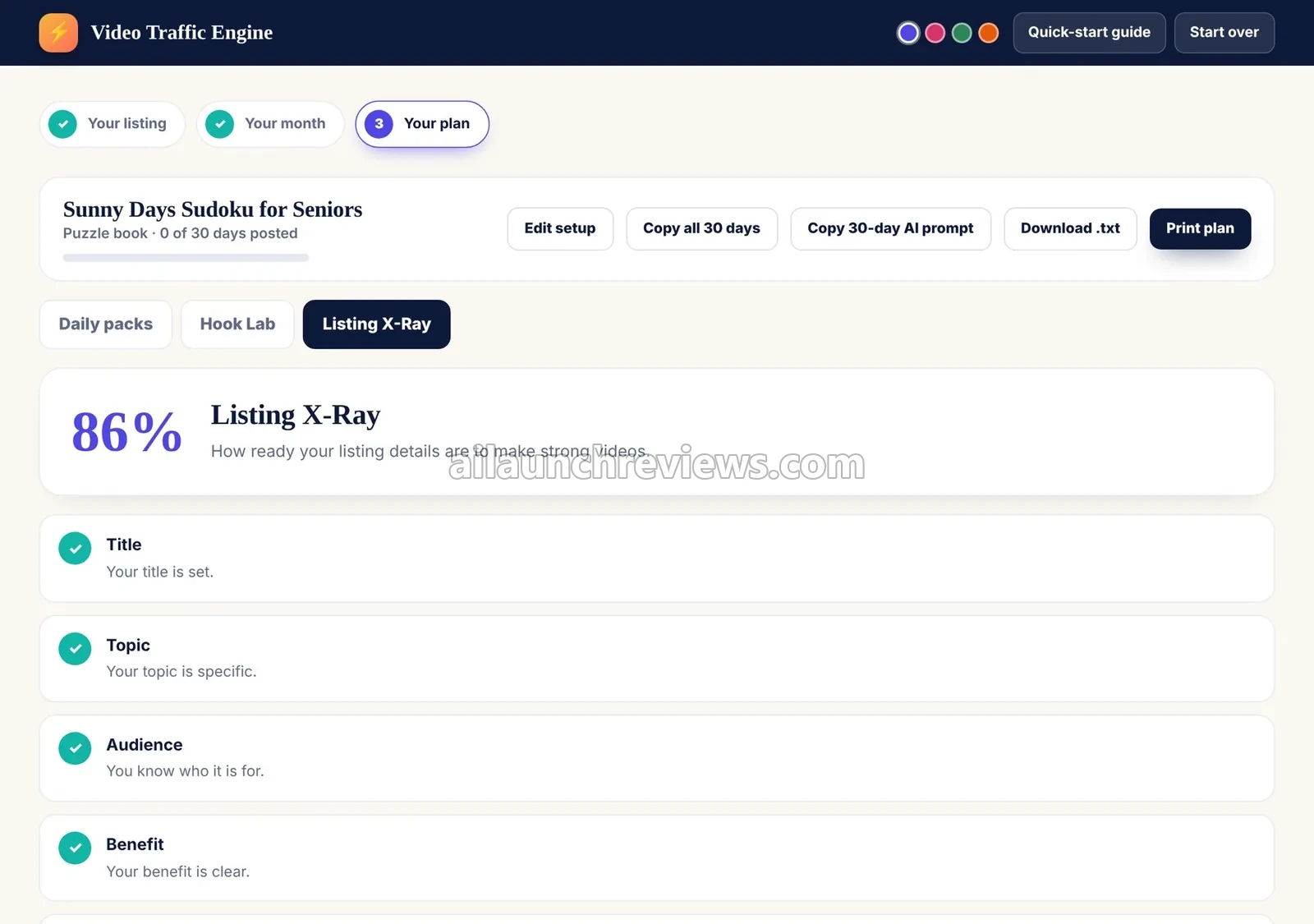
Open the Listing X-Ray tab to see your readiness score and the details your videos should show. The vendor’s example scores 86%.

Video Traffic Engine Listing X-Ray tab with an 86 percent readiness score

Step 16: Export or Print the Plan

Use Copy all 30 days, Copy 30-day AI prompt, Download .txt or Print plan to take the month with you. Edit setup lets you change the listing details later.

Phase 4: Make and Post Your Videos

Step 17: Choose How to Make the Video

Paste the AI video prompt into a video tool, film the shot list with your phone, or mix both.

Step 18: Post on Three Platforms

Post the same video on TikTok, Reels and Shorts, using the platform notes to adjust each one.

Why Should You Consider Using Video Traffic Engine?

Here are 3 reasons why I believe Video Traffic Engine could be a valuable addition to your publishing routine:

It Removes the Daily "What Do I Post?" Problem

Most sellers don’t quit short video because it fails. They quit because they run out of ideas. Video Traffic Engine plans all 30 days in one go, with five rotating formats. What I like here is that the plan tells you what’s next, which is exactly where consistency usually breaks.

You Don't Need a Face, a Camera or a Following

Plenty of authors avoid video because they don’t want to be on camera. Every day includes AI video, image and voice prompts, and the vendor’s FAQ says showing your face is never required. What I like here is the phone-filmed option too, which needs no paid tool at all.

It's Cheap to Test

At $14 one-time with a 14-day money-back guarantee, you can try a full month of content for less than a single day of book ads. What I like here is that the vendor is upfront that results depend on your product and your consistency.

Who Is Video Traffic Engine Best For?

Video Traffic Engine is a great fit for:

  • KDP low-content and puzzle book publishers: planners, logbooks and puzzle books that are live and need their first visitors.
  • Children’s book authors: picture-book and activity-book authors who need parents to find their books.
  • Journal, planner and nonfiction authors: niche publishers who want steady traffic without paying for ads.
  • Etsy printable sellers: shop owners who want more eyes on each digital listing.
  • Camera-shy creators: anyone who wants to post video without showing their face.
  • Busy authors: people who can spare a few minutes a day but not an hour of planning.

It may not suit:

  • People who want results with no posting: the vendor says plainly that you still need to post the videos.
  • Sellers with a large catalogue on the front end alone: it covers one product per month unless you add OTO 1.
  • Anyone who wants automatic posting: the vendor’s pages don’t mention publishing or scheduling straight to TikTok, Reels or Shorts.

Video Traffic Engine Pricing Breakdown: Front-End, OTOs and Coupon

Front-End Price

Video Traffic Engine is available for just $14 (one-time payment), with no monthly subscription required.

Let’s see exactly what’s included in this package: the app with Hook Lab, the 30-day calendar, Listing X-Ray, Reuse Engine and export, a 30-day video pack for one product each month, AI video, image and voiceover prompts, a quick-start guide, a video walkthrough, and four launch-week bonuses.

Compare that with the old way. A single week of book ads can cost more than the whole package, and hiring someone to write 30 scripts and captions costs far more again. The vendor puts it at about 47 cents a day for 30 days of content.

The launch runs from November 20 to November 25, 2026, and the vendor calls the four bonuses launch-week bonuses. The vendor hasn’t announced a price increase after the launch.

You get a 14-day money-back guarantee. According to the vendor, you contact support within 14 days of purchase and ask for a refund if it isn’t for you.

No coupon code has been announced for this launch.

Click the button below to access the main sales page:

Video Traffic Engine OTO Breakdown

Here’s every upgrade in the funnel, in order:

OTO 1: Video Traffic Engine Unlimited Edition ($27 One-Time)

Price: $27 (one-time payment)

The front end covers one product each month. Unlimited Edition removes that limit, so you can plan videos for every book and listing you have. It pays for itself the moment you have a second title you want to promote this month.

Here’s what you’ll unlock with this upgrade: planning for every book and listing instead of one product per month, which the vendor aims at multi-title sellers and agencies.

Who needs it: anyone with more than one active book or listing. Who can skip it: single-title authors.

OTO 2: Video Traffic Engine AI Video Prompt Pack ($37 One-Time)

Price: $37 (one-time payment)

This upgrade is for sellers who plan to make most videos with AI tools. It helps your clips look consistent from day to day, which matters when a feed full of mismatched AI styles can look careless.

The upgrade adds extra video styles, consistent-look prompts, a cover-safe workflow and a prompt cheat sheet for each video tool.

Who needs it: faceless creators who rely on AI video tools. Who can skip it: anyone filming with a phone.

OTO 3: Video Traffic Engine Niche and Season Packs ($47 One-Time)

Price: $47 (one-time payment)

Niche and Season Packs add ready-made angles for children’s, puzzle, journal, coloring and low-content books and Etsy printables, plus seasonal calendars. It pays off when you sell into gift seasons, back-to-school or holiday periods and want angles planned around them.

You’ll also get niche-specific angles that go beyond the general hooks in the front end.

Who needs it: sellers in those niches who plan around seasons. Who can skip it: authors happy with the 20 hooks per product in the front end.

OTO 4: Video Traffic Engine Reader Magnet and Email List Builder ($67 One-Time)

Price: $67 (one-time payment)

Video traffic is rented attention. This upgrade turns viewers into an email list you own, with a freebie, link-in-bio landing page copy and a 5-email welcome sequence.

It pays for itself if you publish more than one book, because a list lets you announce the next one without starting from zero.

Who needs it: authors building a series or a back catalogue. Who can skip it: sellers who already run an email list.

Front-end plus every upgrade comes to $192 ($14 + $27 + $37 + $47 + $67).

Which Plan Should You Pick?

If you have one book, the $14 front end is enough to test whether short video works for you. Multi-title sellers should add OTO 1, since the one-product limit is the first wall you’ll hit. Faceless creators get the most from OTO 2, seasonal sellers from OTO 3, and authors with a series from OTO 4.

Video Traffic Engine Bonuses

According to the sales page, Video Traffic Engine comes with 4 vendor bonuses. The vendor doesn’t state a value for them.

Video Traffic Engine launch-week bonuses illustration with a gift box and video icons

Bonus 1: 50-Hook Swipe File: fifty extra hooks you can use on any video.

Bonus 2: Profile and Bio Setup Pack: prompts for your bio, username, profile picture and pinned video on TikTok, Reels and Shorts.

Bonus 3: Comment-Reply Prompts: prompts that turn comments on your videos into replies that point people to your listing.

Bonus 4: Review-Request Script Set: short spoken scripts that ask viewers to leave reviews.

You’ll also find my own bonus package at the end of this review.

Can You Really Make Money With Video Traffic Engine?

Yes, but the software won’t bring you customers or guarantee income on its own. The vendor says so too: results depend on your product, your content and your consistency.

Drive Traffic to Your Own KDP Books

Readers buy your book on Amazon, and the videos send them there. You build each month around one title and point viewers to your link in bio. There’s no price to set; the payoff is in book sales and royalties. Expect to post most days for the full month to give the calendar a fair test.

Send Buyers to Your Etsy Printables

Etsy shoppers pay for the printable itself. The Engine treats a printable listing the same way as a book, so every script leads back to the shop. Seasonal printables pair well with OTO 3. It takes the same daily posting effort.

Build an Email List for Future Launches

With OTO 4, viewers who grab your freebie join your list. That list doesn’t pay directly, but it lets you sell your next book to people who already know you. Setting up the freebie and sequence takes a few hours upfront.

Plan Videos for Other Authors

The vendor aims OTO 1 at multi-title sellers and agencies. If you help other authors, you could plan and script their monthly videos and charge a flat monthly fee. The vendor’s pages don’t spell out licence terms for client work, so confirm with support first. This is the most effort, since you handle every client’s posting plan.

What I Love About Video Traffic Engine (And What I'd Improve)

PROS

  • Low Price: $14 one-time, with no subscription.
  • Full Month Planned: 30 daily packs built in one go from one form.
  • Complete Daily Packs: hook variations, script, shot list, caption, hashtags and AI prompts for every day.
  • No Face Needed: AI prompts and phone-filmed routes work without being on camera.
  • Three Platforms: one set of scripts works on TikTok, Reels and Shorts.
  • Hook Lab: 20 hooks per product, sorted by angle and copyable in one click.
  • Listing X-Ray: spots missing listing details before you start posting.
  • Easy Export: copy all 30 days, download a .txt file or print the plan.
  • Browser-Based: nothing to install.
  • Honest Claims: the vendor states clearly that views, traffic and sales aren’t guaranteed.

CONS

  • One Product per Month: the front end covers one book or listing each month; unlimited planning needs OTO 1 at $27.
  • AI Tool Costs Are Extra: the app writes the prompts, but the video, image and voice tools you paste them into may have their own fees or credit limits.
  • You Still Do the Posting: the vendor’s pages don’t mention publishing or scheduling straight to the platforms, so every video is made and posted by hand.
  • Key Angles Sit Behind OTOs: niche and seasonal packs cost $47, and the email list builder costs $67.
  • Plain Export Options: the vendor shows .txt download, copy and print, with no other file formats.
  • Licence Not Spelled Out: the vendor’s pages don’t state terms for using the plans in client work.

Video Traffic Engine FAQ

1. Do I need to be on camera?

No. The vendor says you can make every video with the faceless AI route or with phone clips of your book.

2. Do I need a following or an existing account?

No. According to the vendor, you can start from a new account and post from day one.

3. Is Video Traffic Engine cloud-based?

Yes. The vendor says it runs in the browser, with nothing to install.

4. Do I need to buy the OTOs?

No. The front end works on its own. OTO 1 is the one most multi-title sellers will want, since it removes the one-product limit.

5. Do I need to pay for other tools?

Not necessarily. Filming with your phone needs no extra tool, but AI video, image or voice tools may have their own free credits or paid plans.

6. Can I plan more than one book a month on the front end?

No. The front end covers one product each month, and OTO 1 removes that limit.

7. Does it work for Etsy printables?

Yes. The vendor says you can enter any book or printable listing.

8. Can I export or back up my plan?

Yes. You can copy all 30 days, copy the 30-day AI prompt, download a .txt file or print the plan.

9. Can I use it for client work?

Not necessarily. The vendor aims OTO 1 at agencies, but its pages don’t state licence terms for client work, so check with support at geet@geetsoft.com.

10. Is there a refund policy?

Yes. You get a 14-day money-back guarantee; contact support within 14 days of purchase to ask for a refund.

My Final Verdict on Video Traffic Engine

Overall, I believe Video Traffic Engine is worth considering, especially if you have a book or printable that’s live but quiet and you want a simple daily plan for short video. This Video Traffic Engine review found a focused, low-cost tool that solves the “what do I post?” problem well.

Single-title authors can start with the $14 front end. Multi-title sellers should add OTO 1, and authors building a series will get long-term value from the email list builder in OTO 4.

The honest caveat: this review is based on the vendor’s sales pages and app screenshots, not hands-on testing. The app plans and writes your videos, but views and sales still depend on your product and on posting consistently.

GENERAL BONUS

CLAIM YOUR EXCLUSIVE BONUSES IN 3 SIMPLE STEPS

Step 1: Purchase the Video Traffic Engine directly from my website.

Step 2: Once your purchase is complete, forward your receipt to: bonus.samxavier@gmail.com

Step 3 (Final): Sit back and relax! You’ll receive all your bonuses within 24 hours, guaranteed.

Thanks for reading my Video Traffic Engine Review. Wishing you and your family continued success and prosperity!

Author

  • Sam

    I’m Sam, an SEO, digital marketing, and affiliate marketing specialist. Through ailaunchreviews.com, I promote and review AI tools, plugins, themes, and software, helping beginners choose high-quality, efficient products that deliver real value, productivity, and trustworthy results.

Leave a Comment