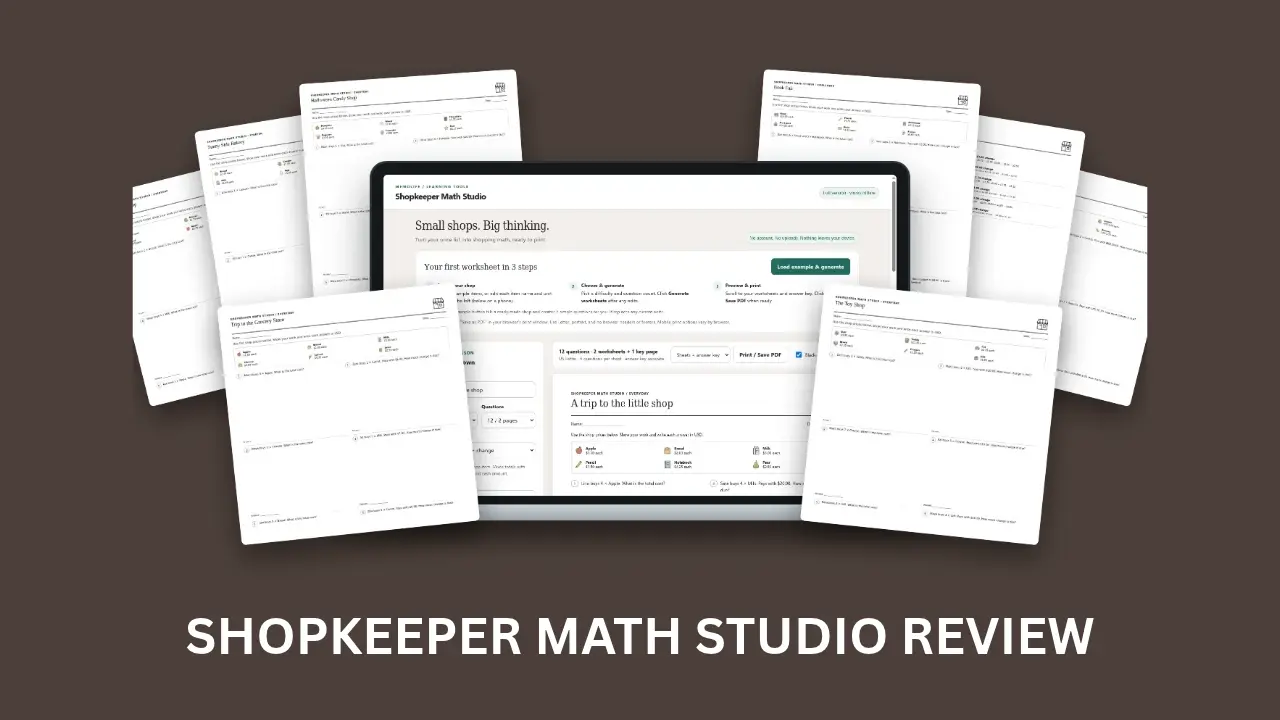
Shopkeeper Math Studio Review: Is This $9 Tool Worth It?

Turn one shop price list into a full money-math worksheet set, answer key included.

Want to sell math printables, but dread writing every word problem by hand? This Shopkeeper Math Studio review looks at a tool built for exactly that job.

Think about it. You invent a shop, pick the prices, write twelve questions, work out every answer and then check that no change comes out negative. That’s an hour gone for one worksheet.

Then tomorrow you need another set, or a harder version, or a pound version for UK buyers. Most people end up reusing a generic download, or give up.

Shopkeeper Math Studio takes a different angle: you type the shop and the prices, and it writes the money-math word problems, lays out the page and builds an answer key with the working shown.

In this Shopkeeper Math Studio review, I’ll explore what the software offers, how it works, and whether it’s worth your investment. Read on to find out if it fits your printable shop, your workbook plans or your classroom.

This review contains affiliate links. If you buy through them, I may earn a commission at no extra cost to you.

Shopkeeper Math Studio is a browser-based worksheet generator that turns a shop price list into printable money-math word problems with an answer key, so Etsy sellers, KDP publishers and teachers can make a fresh, checked set in about a minute.

You stock a small shop with two to six items, choose a level, a currency and a question count, and click generate. The tool writes totals, change and budget questions in a natural voice, places them on a US Letter page with item illustrations, and adds a teacher key that shows the working, not just the answer.

What sets it apart is focus. It isn’t a general worksheet maker stretched to cover money math. It does one topic, shopping math for roughly grades 2 to 6, and gives you control over the shop, the prices, the level and the set code. If you’re building a printable product line around workbooks, you may also like our ReadStrips workbook maker review.

Shopkeeper Math Studio Review: Quick Overview

Owerview
Product CreatorMokasas (Memolife)
Product NameShopkeeper Math Studio
Launch Date2026-Nov-25
Launch Time10:00 AM EST
Front-end Price$9 (one-time payment)
Number of OTOs3 upgrades, $17 to $27
CouponNone announced
Official Website>>>Visit The FE Salespage<<<
BonusYes, Huge Bonuses
Guarantee14 Day Money Back Guarantee
NichePrintables and Educational Worksheets
Vendor’s Supportjohnsmiller.info@gmail.com
Claim My Bonusesbonus.samxavier@gmail.com
RecommendWorth considering for Etsy printable sellers, KDP workbook makers and teachers

Above is the Complete Overview of Shopkeeper Math Studio and I mentioned the creator’s name, the launch date of the product, and the Front End price details.

About the Creator: Mokasas (Memolife)

Shopkeeper Math Studio is sold under the Memolife name, and the vendor’s pages list the vendor as Mokasas, based in Dubai, UAE. The app itself carries a “Memolife / Learning Tools” label at the top of the screen.

The vendor’s pages don’t include a bio, years in the space or a list of previous launches, so I can’t tell you more about the person behind the brand. What I can confirm is how the vendor handles buyers.

Support runs through a listed email address and a Facebook page, and the pages state that WarriorPlus only processes the payment, so product questions and refunds go straight to the vendor. Every page also carries an earnings disclaimer that promises no sales or income, which is a more careful tone than most launches in this niche.

From One Price List to a Full Worksheet Set: What Shopkeeper Math Studio Can Do

Here’s what the front-end version includes, according to the vendor’s sales page.

Stock Your Own Shop: Your Items, Your Prices

Tired of generic worksheets with prices that fit no lesson? In Shopkeeper Math Studio, you start by stocking a shop with two to six items and setting your own unit prices.

The vendor’s example uses an apple at $1.00, bread at $2.00, milk at $3.00 and a notebook at $4.25. Every question on the sheet then comes from that list.

Even better, the shop can be anything you like: a bakery, a toy shop, a lemonade stand or a book fair. Each theme becomes its own worksheet idea.

Shopkeeper Math Studio illustration of a shopkeeper's price list turning into a printed worksheet

Smart Word Problems: Totals, Change and Budgets

Forget writing “Maya buys 3 cheeses” twenty times by hand. The tool builds money-math word problems from your shop in a natural voice, with no templates to fill in.

According to the vendor, it covers the way money math is usually taught: totals with repeated items, change from a round bill, budget checks and two-step questions at the Challenge level.

That gives teachers practice that feels like a real shopping trip, and gives sellers sets that read like a finished resource.

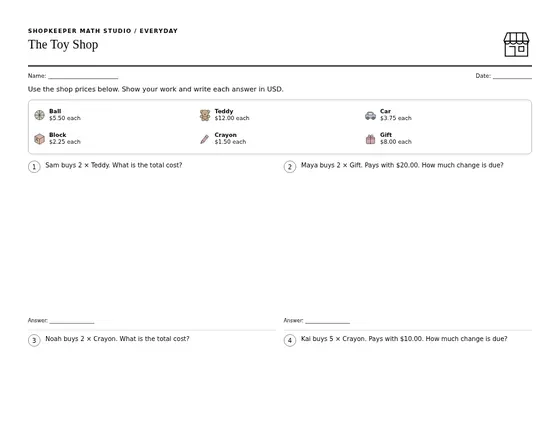
Toy Shop money-math worksheet made with Shopkeeper Math Studio

Three Difficulty Levels: One Shop for Several Grades

Need the same shop for a second grader and a fifth grader? The tool has three levels.

Starter uses whole-dollar totals. Everyday adds change from a payment. Challenge mixes items, budgets and two-step questions. The vendor puts the overall range at roughly grades 2 to 6.

For sellers, this means one shop can become three listings, or one tiered bundle.

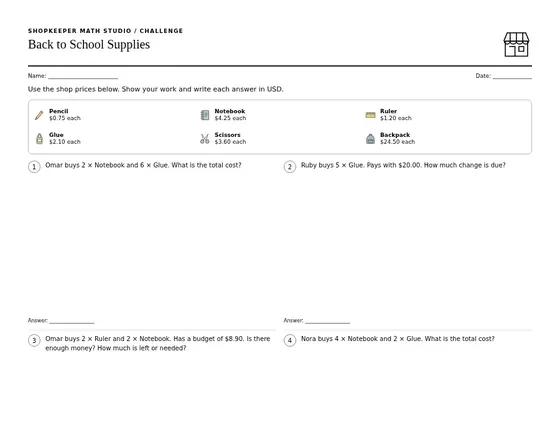
Back to School Challenge-level worksheet made with Shopkeeper Math Studio

Answer Key With Working: Check a Set in Seconds

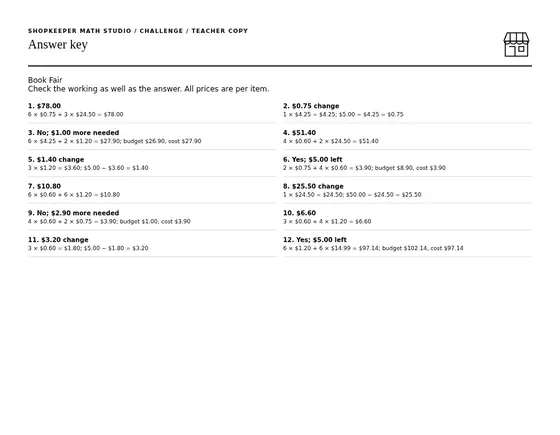
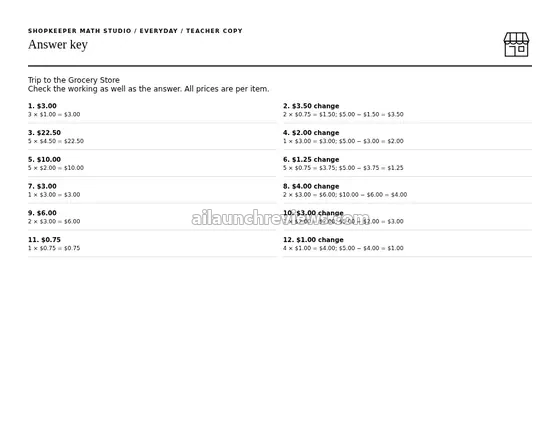
Here’s one of the biggest advantages for anyone selling or teaching with these sheets. Every set comes with its own answer key, and the key shows the working for each question, such as “3 x $1.00 = $3.00”, not just the final number.

Checking a stack of student pages gets faster, and you can explain a wrong answer to a child step by step.

Shopkeeper Math Studio Challenge answer key showing the working for each question

40 Hand-Drawn Items: Pages That Look Like a Real Resource

A page of plain text questions looks like homework. Shopkeeper Math Studio includes 40 hand-drawn item illustrations, including fruits, snacks, school supplies and toys.

Type an item the library doesn’t have? According to the vendor, it gets a clean price tag instead of a wrong picture.

Shopkeeper Math Studio icon for its 40 hand-drawn item illustrations

Four Currencies: USD, GBP, EUR and AED

Selling to buyers outside the US? The tool formats every question and answer key in US dollars, British pounds, euros or UAE dirhams, with the right symbols and decimals.

That lets one shop become four versions for US, UK, European and Gulf shoppers without rewriting a single question.

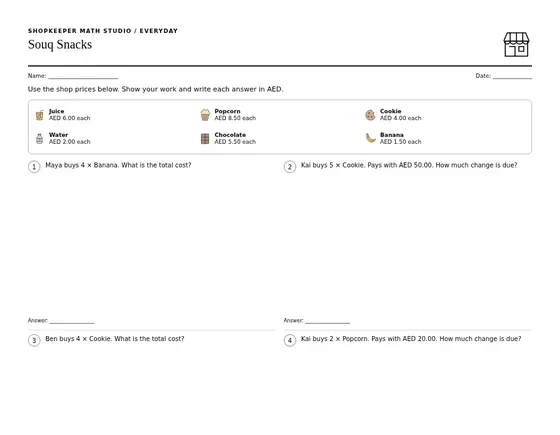
Souq Snacks worksheet priced in UAE dirhams, made with Shopkeeper Math Studio

Seed Codes: Reprint the Same Set or Make a New One

Lost a worksheet you printed last month? Each set has a code. The same code always reprints the exact same set, and a new code gives you a brand-new one.

Sellers can rebuild a listing’s files at any time, and teachers get a fresh set when students have memorized the old answers.

Level-Aware Items: No Forced Questions

Of course, a $4.25 notebook doesn’t belong in a whole-dollar Starter sheet. According to the vendor, items that don’t fit the chosen level are hidden rather than forced into a bad question.

6 to 30 Questions: From Warm-Up to Full Lesson

Want a quick five-minute warm-up, or a full lesson? You choose the question count, from 6 to 30 per set.

The app screen shows six questions per worksheet page, so a 12-question set prints as two worksheets plus a separate key page.

Print-Ready Layout: US Letter and PDF From Any Browser

Every set prints on US Letter, and the vendor describes the layout as copier-friendly and safe in black and white.

There’s no separate export tool to learn. You print from the app, or use your browser’s print window to save a clean PDF for a listing or a workbook interior.

Shopkeeper Math Studio icon for its print-ready US Letter layout

Complete Worksheet Pages: Price Grid, Work Space, Name and Date Lines

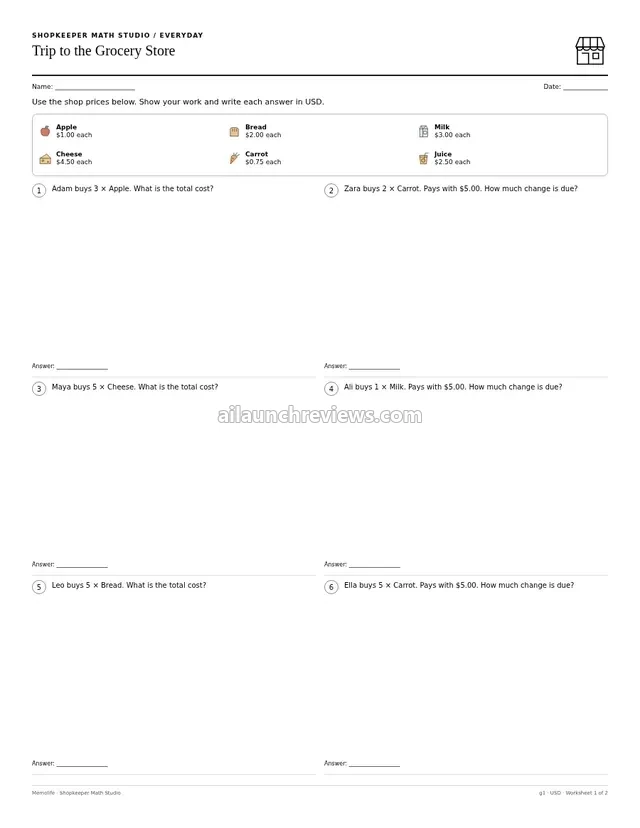
Each page includes a shop price grid at the top, the illustrated items, the word problems, room to show the working, and name and date lines.

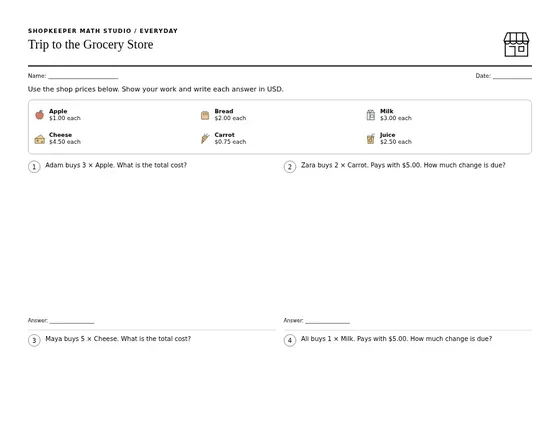
Grocery Store worksheet page with price grid and work space, made with Shopkeeper Math Studio

Selling Rights: List the Finished Worksheets as Your Own

According to the vendor, the $9 license lets you sell the finished worksheets, printables and workbook interiors you make as your own listings on sites like Etsy, Teachers Pay Teachers or Amazon KDP.

You can’t sell the tool, your access links, or the sets as PLR or resale-rights bundles. Branded covers sit in Publisher Studio, and client work sits in the Client License (both covered in the pricing section). For more kids’ printable ideas, see our WonderTrail Kids Activity Vault review.

Illustration of a creator with a storefront of printable worksheets made with Shopkeeper Math Studio

Ready to try it? Grab Shopkeeper Math Studio through the button below.

Shopkeeper Math Studio in Action: A Complete Step-by-Step Software Walkthrough

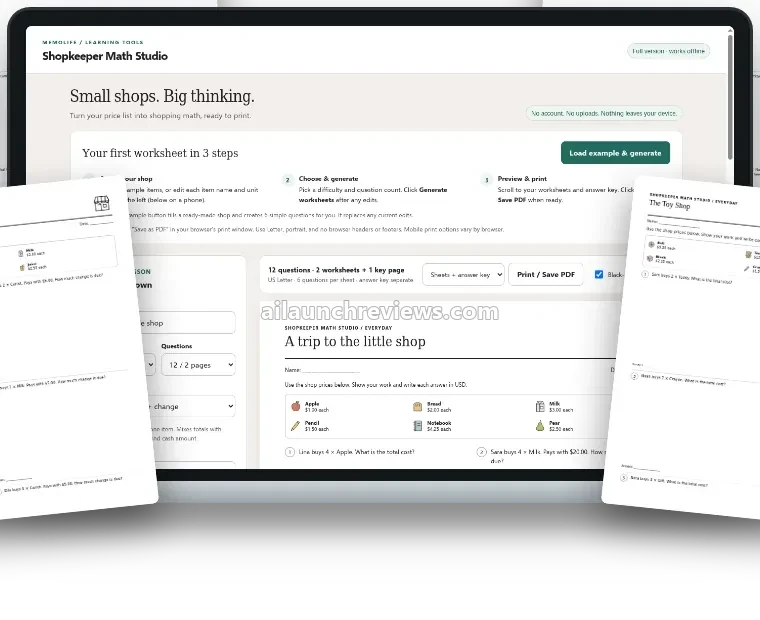
I haven’t used the software myself, so this walkthrough follows the vendor’s sales page, its “first worksheet in 3 steps” guide and the app screen shown on the sales page. For the example, I’ll use the vendor’s own corner grocery: an apple, bread, milk and a notebook.

Phase 1: Set Up Your Shop

Step 1: Open the Studio. After purchase, you open Shopkeeper Math Studio from your access page, and it runs in your browser. The screen greets you with a short “Your first worksheet in 3 steps” guide.

Step 2: Load the Example Shop. New to the tool? Click Load example & generate. According to the app’s own note, it fills in a ready-made shop and creates simple questions for you, and it replaces any edits you’ve made.

Shopkeeper Math Studio app screen with the three-step guide and a worksheet preview

Step 3: Pick a Shop Theme. Decide what your shop sells. The vendor’s examples include a grocery store, a bakery, a pizza night and a Halloween candy shop.

Step 4: Add Two to Six Items. Type the items your shop stocks. In our example, that’s an apple, bread, milk and a notebook.

Step 5: Set Each Unit Price. Edit each item’s name and unit price in the panel on the left (below the preview on a phone). Our example uses $1.00, $2.00, $3.00 and $4.25.

Phase 2: Choose and Generate

Step 6: Choose a Level. Pick Starter, Everyday or Challenge. Everyday is a good middle ground for our grocery, since it adds change questions to the totals.

Step 7: Set the Question Count. Use the Questions menu to choose how many questions you want, anywhere from 6 to 30. The app shows the result as pages, for example 12 questions across 2 pages.

Step 8: Pick a Currency. Choose US dollars, British pounds, euros or UAE dirhams. Every price and answer is formatted to match.

Step 9: Enter a Set Code. Keep the current code or type a new one. Remember it if you want to reprint this exact set later.

Step 10: Click Generate. Click Generate worksheets after any edits. According to the vendor, a full set appears in about a minute or less.

Finished grocery store worksheet generated by Shopkeeper Math Studio

Phase 3: Preview, Check and Print

Step 11: Review the Sheets and Key. Scroll through the student worksheets and the answer key below them. Each key lists the working for every question.

Shopkeeper Math Studio Everyday answer key with the working shown

Step 12: Choose What to Print. Use the print menu next to the preview, which shows Sheets + answer key on the app screen, to decide what goes into the file.

Step 13: Click Print / Save PDF. Click Print / Save PDF to open your browser’s print window.

Step 14: Save a Clean PDF. The vendor’s tip is to pick “Save as PDF”, Letter size, portrait, with browser headers and footers turned off. Mobile print options vary by browser.

Phase 4: Turn One Shop Into a Product Line

Step 15: Switch the Level. Go back, change Everyday to Starter or Challenge, and generate again. Now you have three tiers from one shop.

Step 16: Change the Currency. Swap dollars for pounds, euros or dirhams to make a version for another market.

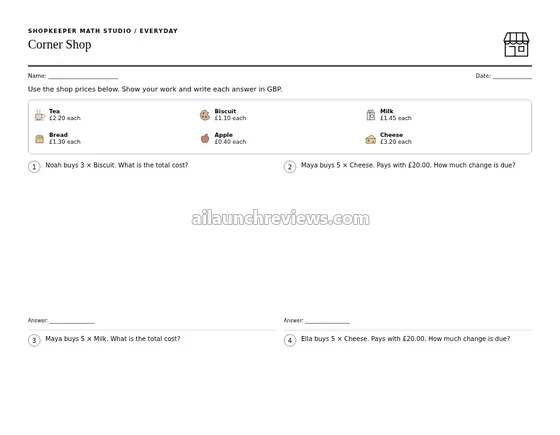
Corner Shop worksheet priced in British pounds, made with Shopkeeper Math Studio

Step 17: Change the Code for a Fresh Set. Type a new code for brand-new questions from the same shop, or keep the old one to reprint the same set.

Why Should You Consider Using Shopkeeper Math Studio?

Here are 3 reasons why I believe Shopkeeper Math Studio could be a valuable addition to your printable business or your classroom:

It Cuts Worksheet Prep From an Hour to About a Minute

Writing one decent set of word problems by hand means inventing a shop, writing the questions, solving each one and checking the change. The vendor puts that at about an hour per set.

Shopkeeper Math Studio claims a complete set in about a minute, with the key already worked out. What I like here is that the time saving repeats every time you need a new level, season or currency.

Every Set Comes With a Key That Shows the Working

An unchecked or missing answer key is one of the fastest ways to earn a bad review on a printable listing.

Here, each set gets its own teacher copy with the working shown for all 6 to 30 questions. I think that matters more than the illustrations, because it’s the part buyers and teachers actually rely on.

One Small Payment Instead of Another Subscription

Worksheet sites often charge monthly for downloads everyone else already has. This one is a one-time $9 payment, and the vendor’s FAQ says you can make unlimited sets.

Of course, the software won’t automatically bring you customers or guarantee income. But at this price, one set you’d otherwise write by hand covers the cost.

Who Is Shopkeeper Math Studio Best For?

Shopkeeper Math Studio is a great fit for:

  • Etsy printable sellers: each shop theme, level and currency can become its own instant-download listing.
  • KDP workbook publishers: money-math sets can fill a themed workbook interior.
  • Elementary teachers: fresh practice with real prices and a ready key, roughly for grades 2 to 6.
  • Homeschool parents: a new set every week without buying another workbook.
  • Tutors: quick extra practice for a student who needs more work on change or budgets (client work needs the Client License).
  • Sellers outside the US: pound, euro and dirham versions are built in.

It may not suit:

  • Anyone who needs math topics beyond money, such as fractions, time or geometry.
  • Sellers who need A4 pages, since the vendor’s pages only mention US Letter.
  • Buyers who want a done-for-you product library rather than a tool they use themselves.

Shopkeeper Math Studio Pricing Breakdown: Front-End, OTOs and Coupon

Here’s how the funnel is priced, from the front end through every upgrade.

Front-End Price

Shopkeeper Math Studio is available for just $9 (one-time payment), with no monthly subscription required.

The front end includes the browser-based worksheet generator, three levels (Starter, Everyday and Challenge), 6 to 30 questions per set with a full answer key, 40 hand-drawn item illustrations, four currencies, unlimited sets with reprintable codes, the right to sell the finished worksheets as your own listings, and the four vendor bonuses covered below.
Compare that with an afternoon of writing and checking questions by hand, or a monthly worksheet subscription.

The vendor says $9 is the launch-week price, that the price goes up after launch week, and that the bonuses may be removed or sold separately then. The pages don’t give an exact end date for launch week.

Your purchase is covered by a 14-day money-back guarantee. According to the vendor, if the tool doesn’t deliver real value for you, you email them within 14 days of purchase and they’ll refund you.

No coupon code has been announced for this launch.

Click the button below to access the main sales page:

Shopkeeper Math Studio OTO Breakdown

Here’s every upgrade in the funnel, in order:

OTO 1: Shopkeeper Math Studio Problem Packs ($17 One-Time)

Price: $17 (one-time payment)

The main tool gives you one everyday shop and three levels. Problem Packs adds eight themed shops, each with its own look, items and prices, plus six problem families instead of three levels.

It pays for itself if you plan to list several themes or build a series, since a buyer scrolling Etsy sees plenty of worksheets that look the same.

Here’s what you’ll unlock with this upgrade: eight themed shops (Corner Grocery, Fruit Stand, Toy Store, School Supplies, Bakery Treats, Movie Night, Halloween Candy and Holiday Market), six problem families that add two-step questions (find the total, then the change) and compare questions (which basket costs more, and by how much), 12 to 30 questions per set, an answer key with full working, US Letter layout and the same four currencies. Selling rights match your main license.

Shopkeeper Math Studio Problem Packs illustration of eight themed shops on one street

Who needs it: sellers building a multi-theme catalog or seasonal packs, and teachers who want harder, mixed sets. Who can skip it: anyone happy making their own shop themes with the main generator.

OTO 2: Shopkeeper Math Studio Publisher Studio ($17 One-Time)

Price: $17 (one-time payment)

A plain stack of pages looks like homework, while a set with a cover, a title and a name looks like a product. Publisher Studio adds that packaging.

You add a product title, subtitle and byline, pick a cover drawing and an accent color, and the studio builds the cover, worksheets, footer brand and answer key as one Letter-size printable. It pays for itself the moment you need a listing thumbnail that stands out or a workbook opener for KDP. If KDP is your main market, our TripDoodle KDP map book tool review covers another tool in the same space.

This upgrade adds: a branded cover page with title, subtitle and byline, two cover drawings, five accent color themes, your footer brand on every worksheet and key, a publisher mix mode that puts all problem families in one set, a sheets-only print option, and PDF saving from your browser.

Shopkeeper Math Studio Publisher Studio illustration of a creator packaging branded worksheets

Who needs it: Etsy and KDP sellers who want consistent covers and branding across a series or bundle. Who can skip it: teachers and parents printing for their own class or child.

OTO 3: Shopkeeper Math Studio Client License ($27 One-Time)

Price: $27 (one-time payment)

Your $9 license covers your own listings. The Client License covers the rest: custom sets for paying clients, tutoring students and membership groups, white-label materials under your own business name, and bulk catalogs or multi-volume series.

It pays for itself if you run a tutoring business, deliver paid workshops, or make custom sets for a school or store. Unlike the first two upgrades, it’s a license, not a tool, so it doesn’t include Problem Packs or Publisher Studio.

With it, you get: rights for client work, white-label use with Memolife branding removed, bulk catalogs and numbered series without volume limits, use inside paid workshops and 1:1 services, custom orders, and a printable license certificate with your name. It still doesn’t allow reselling the tool, access links, PLR or master-resell bundles, or selling the drawing library as standalone clipart.

Shopkeeper Math Studio Client License illustration of a tutor serving clients under their own brand

Who needs it: tutors, agencies, course creators and publishers producing sets for others or in volume. Who can skip it: anyone selling only their own Etsy or KDP listings.

Front-end plus every upgrade comes to $70 ($9 + $17 + $17 + $27). The vendor lists no bundle deal or downsells, and each upgrade has the same 14-day guarantee.

Which Plan Should You Pick?

If you’re a teacher or parent printing for your own students, the $9 front end is all you need. Etsy and TPT sellers who want variety should add Problem Packs, and KDP or brand-focused sellers will get the most from Publisher Studio. Pick the Client License only if you’ll make sets for paying clients, white-label them or publish in bulk.

Shopkeeper Math Studio Bonuses

According to the sales page, Shopkeeper Math Studio comes with 4 vendor bonuses, included with the launch-week price and delivered on your access page:

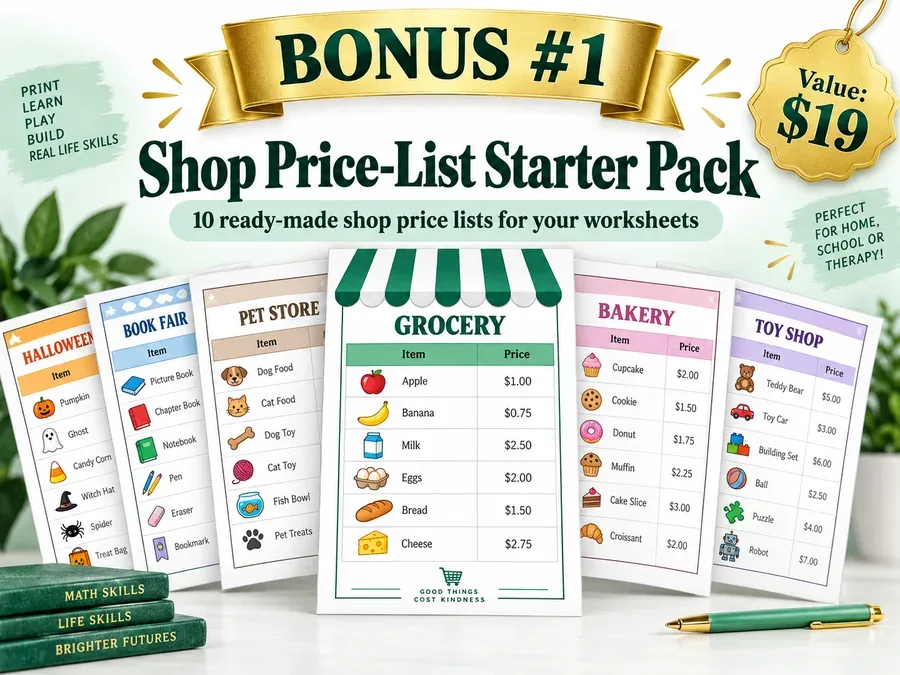
Shop Price-List Starter Pack (Value $19)

Ten ready-made shop price lists, including grocery, bakery, toy shop, pet store, book fair and Halloween, with realistic prices at every level to copy into the studio.

Shopkeeper Math Studio bonus 1: Shop Price-List Starter Pack

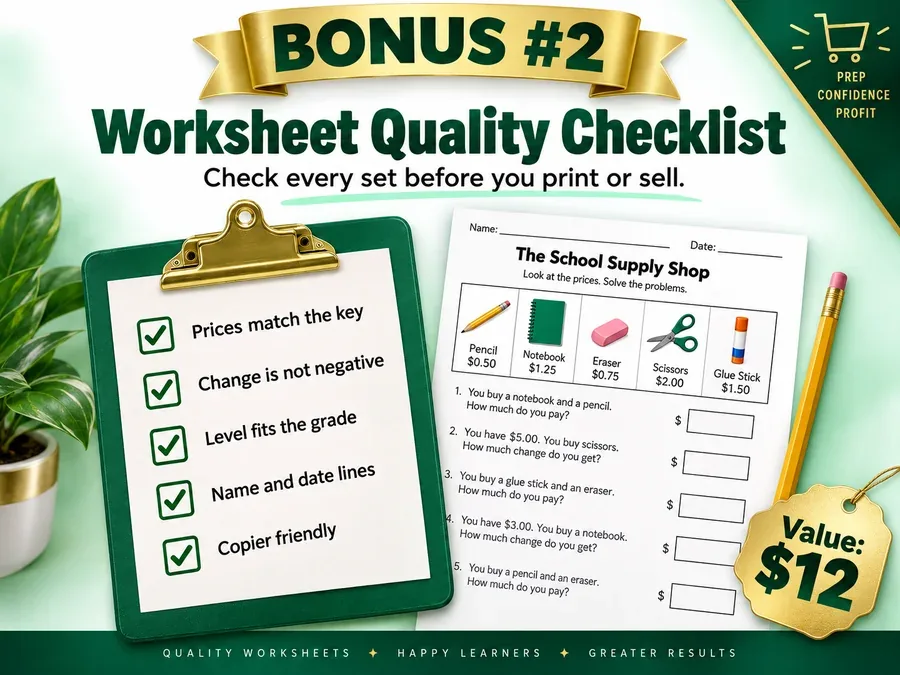
Worksheet Quality Checklist (Value $12)

A one-page printable checklist to run before you hand out or sell any set: prices and key match, change is never negative, the level fits the grade, and the page is copier-friendly.

Shopkeeper Math Studio bonus 2: Worksheet Quality Checklist

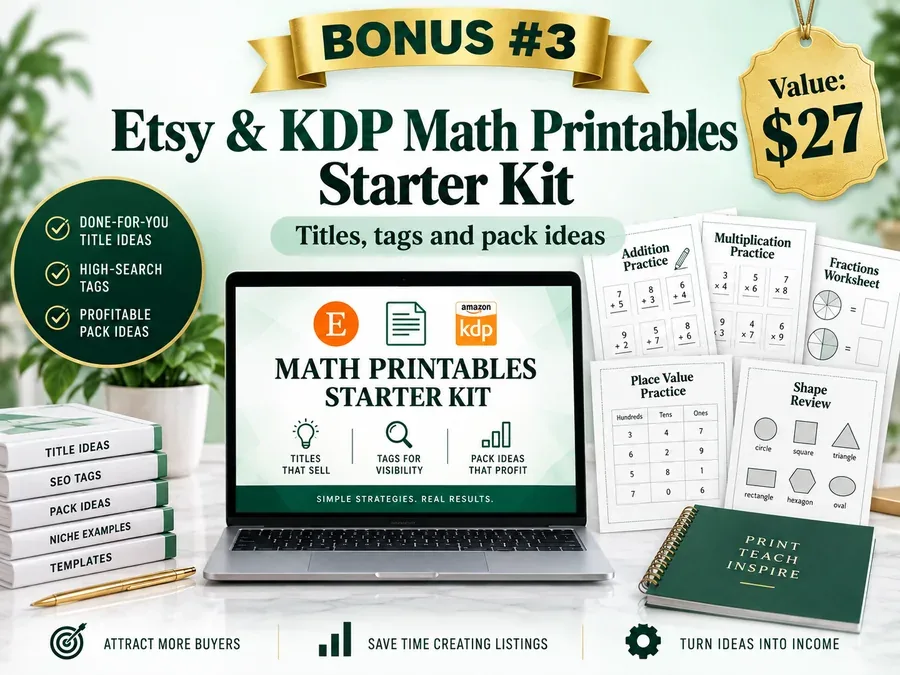
Etsy & KDP Math Printables Starter Kit (Value $27)

Title and description templates, tag ideas, bundle structures for Starter, Everyday and Challenge packs, a seasonal calendar and a listing checklist. The vendor describes it as planning guidance only, with no income promises.

Shopkeeper Math Studio bonus 3: Etsy and KDP Math Printables Starter Kit

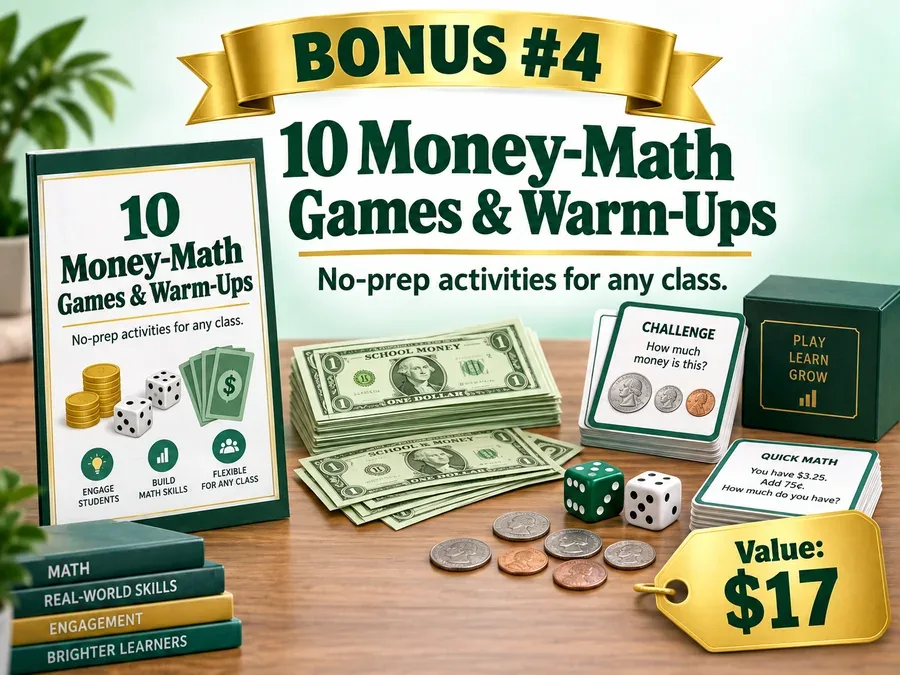
10 Money-Math Games & Warm-Ups (Value $17)

Ten no-prep classroom and home activities that use your printed sets, such as store role-play, change races and budget challenges.

Shopkeeper Math Studio bonus 4: 10 Money-Math Games and Warm-Ups

You’ll also get my own bonus package, shown at the end of this review.
Can You Really Make Money With Shopkeeper Math Studio?

Yes, but the software won’t bring you customers or guarantee income on its own. The vendor says the same thing on every page. Here are the realistic ways the license allows.

Sell Instant-Download Worksheets on Etsy or TPT

Parents, teachers and homeschoolers pay for ready-to-print practice. You’d make one listing per theme and level, using the vendor’s example of one shop, one level and one clean preview, or bundle all three levels.

Set your price by checking similar money-math listings. The effort goes into listings and previews, not the worksheets.

Publish Money-Math Workbooks on Amazon KDP

KDP buyers look for themed workbooks. You’d collect several sets into a money-math workbook interior, and the vendor suggests Publisher Studio (OTO 2) for a branded cover page.

Pricing follows KDP’s own rules and your page count. Expect real work on formatting and the listing, and check KDP’s current content rules first.

Build Seasonal and Niche Packs

Schools and parents look for themed practice around back-to-school, Halloween and the winter holidays. You’d build a pack for each season, and Problem Packs (OTO 1) adds ready-made Halloween Candy and Holiday Market themes.

The vendor’s bonus kit includes a seasonal calendar, so you can list packs before each season starts. This takes planning more than skill.

Offer Custom Sets to Tutoring Clients

Tutors, homeschool co-ops and small schools may pay for sets built around their own themes or under their own brand. This needs the Client License (OTO 3), which covers client work, white-label materials and paid workshops.

Price per set or bundle based on your time. It’s the most hands-on method, since you deal with each client directly.

What I Love About Shopkeeper Math Studio (And What I'd Improve)

PROS:

  • Answer Key With Working: every set includes a teacher copy that shows how each answer is reached.
  • Your Own Shop and Prices: two to six items at any prices you choose, so sets fit your lesson or listing.
  • Three Levels: Starter, Everyday and Challenge turn one shop into a tiered product.
  • Four Currencies: USD, GBP, EUR and AED versions without rewriting anything.
  • Reprintable Set Codes: the same code always brings back the exact same set.
  • Level-Aware Items: items that don’t fit a level are hidden instead of forced into a bad question.
  • Classroom-Ready Pages: price grid, work space, and name and date lines on every sheet.
  • Low One-Time Price: $9 with no subscription and unlimited sets, according to the vendor.
  • Selling Rights Included: you can list the finished worksheets as your own from day one.
  • Honest Marketing: the vendor promises no income and spells out the license limits clearly.

CONS:

  • Money Math Only: there’s no fractions, time or other math topics, so it’s one product line, not a full curriculum.
  • US Letter Only: the vendor’s pages mention US Letter and no A4 option, which matters for UK, European and Gulf buyers.
  • Mixed Messages on Two-Step Questions: the sales page lists two-step problems at the Challenge level, while the Problem Packs page says its two-step and compare families are something the main tool doesn’t make.
  • Covers and Branding Cost Extra: branded cover pages and your footer brand need Publisher Studio ($17).
  • Client Work Needs a Second License: white-label, client and bulk use need the $27 Client License.
  • Thin Vendor Background: the pages name the vendor as Mokasas and Memolife but give no bio or launch history, and the bonuses may be removed after launch week.

Shopkeeper Math Studio FAQ

1. Do I need design or teaching experience to use it?

No. According to the vendor, you type your shop items and prices, choose a level and click generate, and the layout, word problems and answer key are built for you.

2. Does it run in the browser, or do I install something?

Yes, it runs in your browser. The vendor describes it as a worksheet generator you open from your access page, and you print or save a PDF from your browser.

3. Do I need the OTOs to make and sell worksheets?

No. The $9 front end makes unlimited sets and lets you sell the finished worksheets as your own listings. The upgrades add themes (OTO 1), covers and branding (OTO 2) and client rights (OTO 3).

4. Can I sell the worksheets I make?

Yes. You can sell finished worksheets, printables and workbook interiors on Etsy, TPT or KDP as your own listings. You can’t sell the tool, your access links, or the sets as PLR or resale-rights bundles.

5. Are there API keys, credits or monthly fees?

No. The vendor’s FAQ describes a one-time $9 payment with lifetime access to the tool, and the pages mention no API keys or credit limits.

6. How do I export or back up my worksheets?

Not necessarily. The vendor doesn’t describe a separate export or backup feature. You save each set as a PDF through your browser’s print window, and the same set code always reprints the exact same set, so keeping a note of your codes works as a backup.

7. Can I use it on a phone or tablet?

Yes. The app’s own guide mentions how the layout works on a phone, though the vendor notes that mobile print options vary by browser, so a computer is easier for saving PDFs.

8. Can I make worksheets for clients or under my own brand?

Not necessarily with the front end. Client work, white-label use and bulk catalogs need the Client License ($27), and branded covers and footers come with Publisher Studio ($17).

9. How do I get support?

Yes, support is available by email and through the vendor’s Facebook page. WarriorPlus only processes the payment, so product questions go to the vendor directly.

10. Is there a refund policy?

Yes. The front end and every upgrade carry a 14-day money-back guarantee. You email the vendor within 14 days of purchase to request a refund.

My Final Verdict on Shopkeeper Math Studio

Overall, I believe Shopkeeper Math Studio is worth considering, especially if you want a fast way to make money-math worksheets with checked answer keys for Etsy, KDP or your own classroom. For $9, it does one job and covers the parts that take the most time by hand.

Teachers and parents can stop at the front end. Printable sellers who want variety should look at Problem Packs, KDP sellers at Publisher Studio, and tutors or agencies at the Client License.

To be clear, this Shopkeeper Math Studio review is based on the vendor’s sales pages, upgrade pages and sample worksheets, not my own hands-on testing. The 14-day guarantee gives you time to make a few sets and decide for yourself.

GENERAL BONUS

CLAIM YOUR EXCLUSIVE BONUSES IN 3 SIMPLE STEPS

Step 1: Purchase the Shopkeeper Math Studio directly from my website.

Step 2: Once your purchase is complete, forward your receipt to: bonus.samxavier@gmail.com

Step 3 (Final): Sit back and relax! You’ll receive all your bonuses within 24 hours, guaranteed.

Thanks for reading my Shopkeeper Math Studio Review. Wishing you and your family continued success and prosperity!

Author

  • Sam

    I’m Sam, an SEO, digital marketing, and affiliate marketing specialist. Through ailaunchreviews.com, I promote and review AI tools, plugins, themes, and software, helping beginners choose high-quality, efficient products that deliver real value, productivity, and trustworthy results.

Leave a Comment