Turn the real streets of 20 famous cities into kids’ travel activity books you can publish on KDP.
Imagine a child solving a maze in their activity book, then walking the same streets in Rome the next morning. That’s the idea behind the product in this TripDoodle review.
Think about it. Most kids’ travel activity books put the city in the title and nowhere else. The mazes and word grids inside could be about any place on earth.
Doing it properly the old way is slow. You’d draw a map puzzle by hand for hours, check every street so the maze has a way out, draw the answer page, then start again from nothing for the next city.
TripDoodle takes a different route: a browser tool that draws puzzles on real street maps and builds a print-ready KDP interior in one press.
In this TripDoodle review, I’ll explore what the tool offers, how it works, and whether it’s worth your investment. Read on to find out if it fits your KDP publishing plans.
This review contains affiliate links. If you buy through them, I may earn a commission at no extra cost to you.
Table of Contents
ToggleWhat Is TripDoodle?
TripDoodle is a browser-based book maker that draws mazes, sightseeing tours and secret-message puzzles on real city street maps, so Amazon KDP publishers can create kids’ travel activity books without drawing a single page.
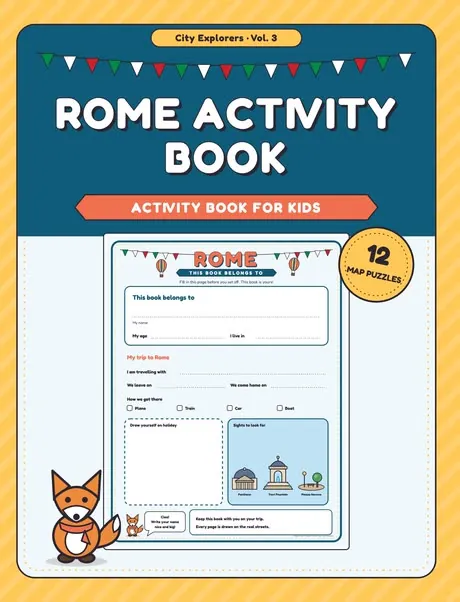
You pick a city, press once, and get a finished book: a name page, a packing list, twelve puzzles, an explorer award and an answer page for every puzzle. It downloads as a 300 dpi PDF at 8.5 x 11 in, with a title, subtitle, description and keywords for the KDP form.
What sets it apart is that the city lives inside the puzzle. The streets, rivers, parks and buildings come from OpenStreetMap, and the vendor says it uses no AI service, so there are no credits to buy. If you also publish general kids’ activity books, my WonderTrail Kids Activity Vault review covers a themed activity page collection.
TripDoodle Review: Quick Overview
| Product Creator | Vũ Hoàng Long |
| Product Name | TripDoodle |
| Launch Date | 2026-Nov-24 |
| Launch Time | 9:00 AM ET |
| Front-end Price | $17 (one-time payment) |
| Number of OTOs | 3 upgrades, $37 to $67 |
| Coupon | None announced |
| Official Website | >>>Visit The FE Salespage<<< |
| Bonus | Yes, Huge Bonuses |
| Guarantee | 30 Day Money Back Guarantee |
| Niche | KDP Kids’ Travel Activity Books |
| Vendor’s Support | longvu271205@gmail.com |
| Claim My Bonuses | bonus.samxavier@gmail.com |
| Recommend | Worth considering for KDP publishers of kids’ activity books |
Above is the Complete Overview of TripDoodle and I mentioned the creator’s name, the launch date of the product, and the Front End price details.
About the Creator: Vũ Hoàng Long
TripDoodle is made and sold by Vũ Hoàng Long, based in Vietnam, according to the product’s support page and terms of use. He handles support and refunds directly, and the support page says a person reads every message, with replies aimed within two business days.
The vendor’s pages don’t list his earlier launches or how long he has been selling software, so I can’t comment on his track record. What I can confirm is the paperwork: a published terms of use, a privacy policy, a clear 30-day refund policy for every package, and a support page with fixes for common login and upgrade problems.
I also like the tone of his pages. They make no income claims, ask affiliates not to call TripDoodle “done for you”, and say plainly that KDP reviews every book.
From One City Map to a Finished KDP Book: What TripDoodle Can Do
Here’s what the front end, TripDoodle Starter, does, based on the vendor’s sales page and sample pages.
Real Street Maps: The City Is in the Puzzle
Tired of travel books where the city only appears on the cover? TripDoodle draws every puzzle on the real street map of the place, using OpenStreetMap data for streets, rivers, parks and buildings.
OpenStreetMap allows commercial use with a credit line, and TripDoodle prints that line in your book for you. Even better, a child who solves the page can walk the route on the trip.
20 Starter Cities: Built and Tested
Starter opens 20 cities: Amsterdam, Athens, Barcelona, Berlin, Boston, Budapest, Florence, Istanbul, Kraków, Lisbon, London, Madrid, New York, Paris, Porto, Prague, Rome, Seville, Venice and Vienna.
According to the vendor, each one is already built and tested. That’s 20 possible titles before you buy any upgrade.
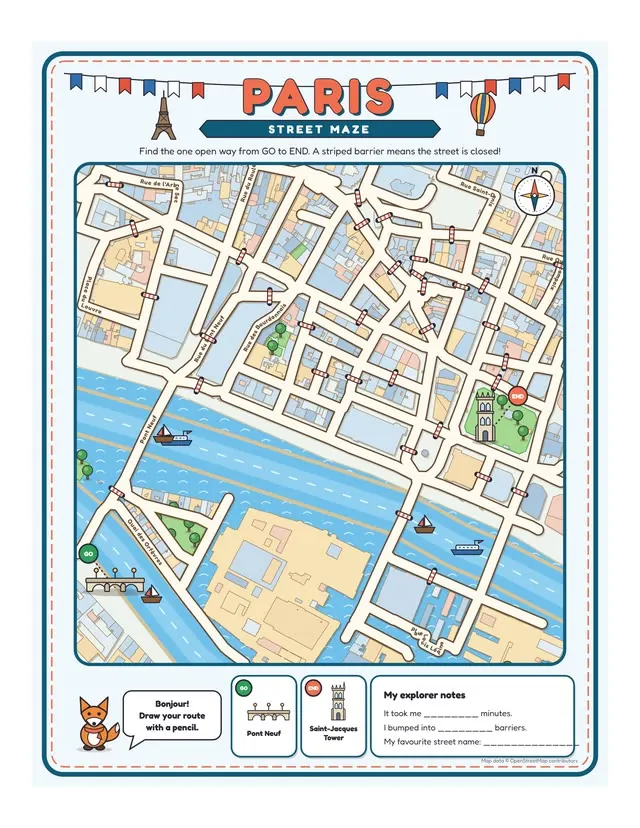
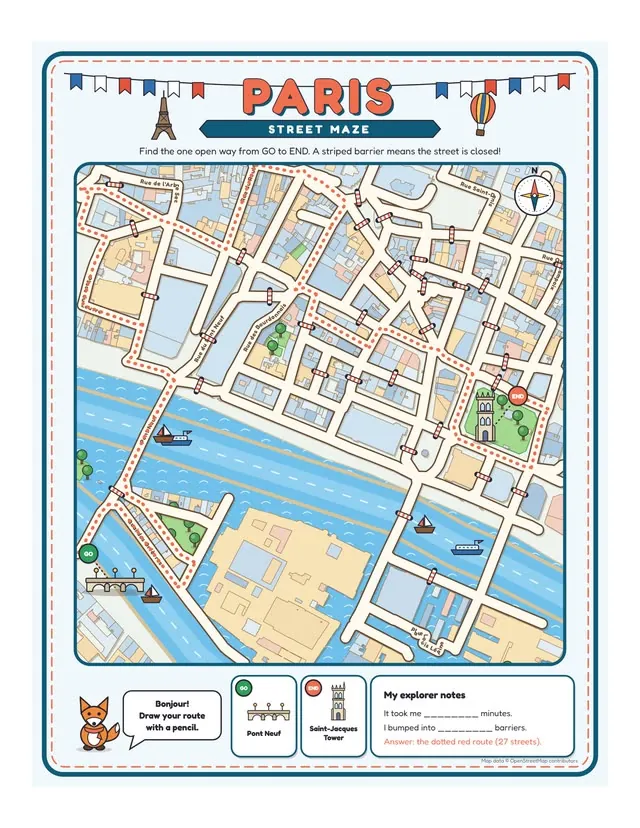
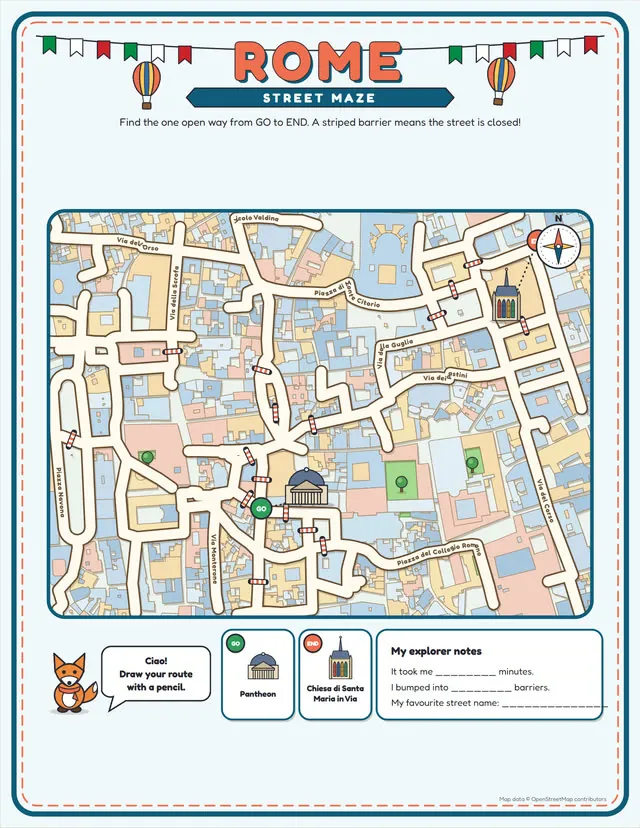
Street Maze: One Open Way Through Real Streets
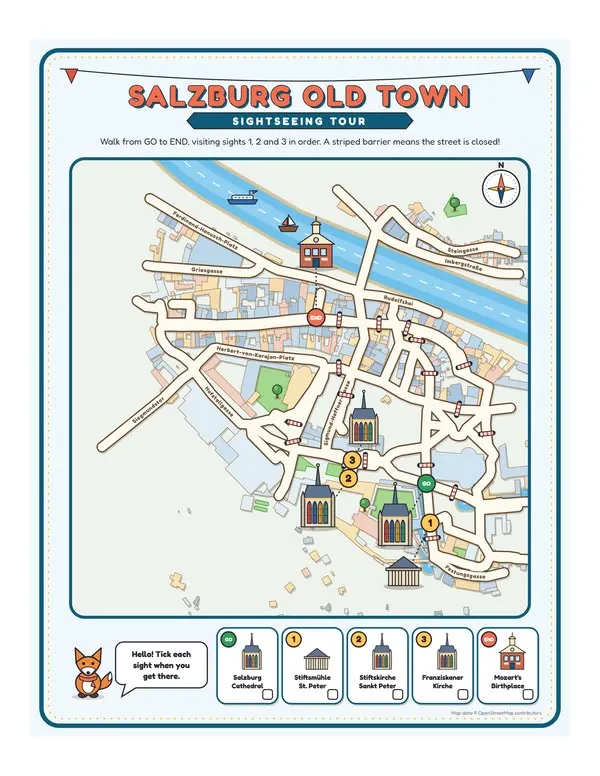
Forget generic grid mazes. The street maze finds one open way through the actual old town, with striped barriers marking closed streets.
It’s the signature page of the book, and the one parents will recognise as different from the usual activity book.
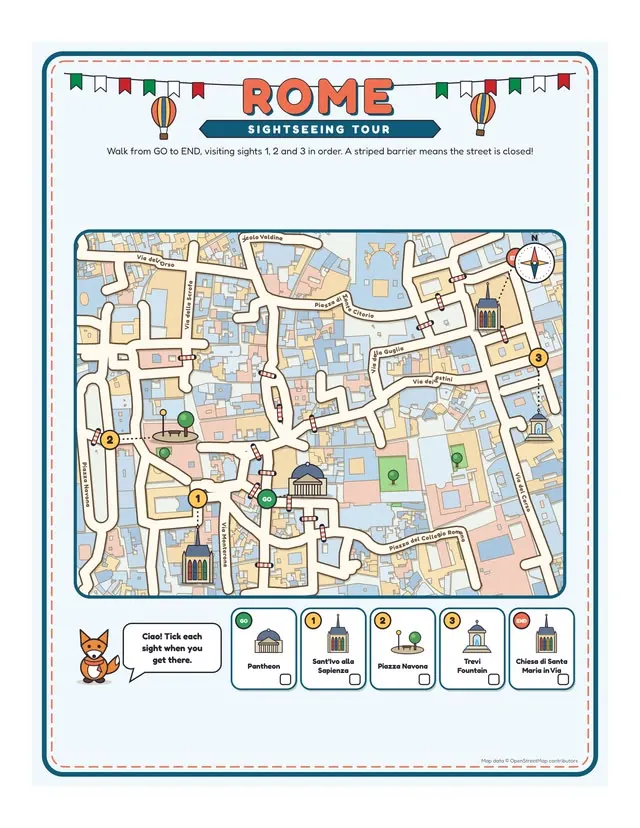
Sightseeing Tour: Visit the Sights in Order
Want a puzzle that teaches the city, too? The sightseeing tour asks the child to walk from start to end, visiting real landmarks in order.
The landmarks are named on the page, so the book doubles as a simple guide to the city’s main sights.
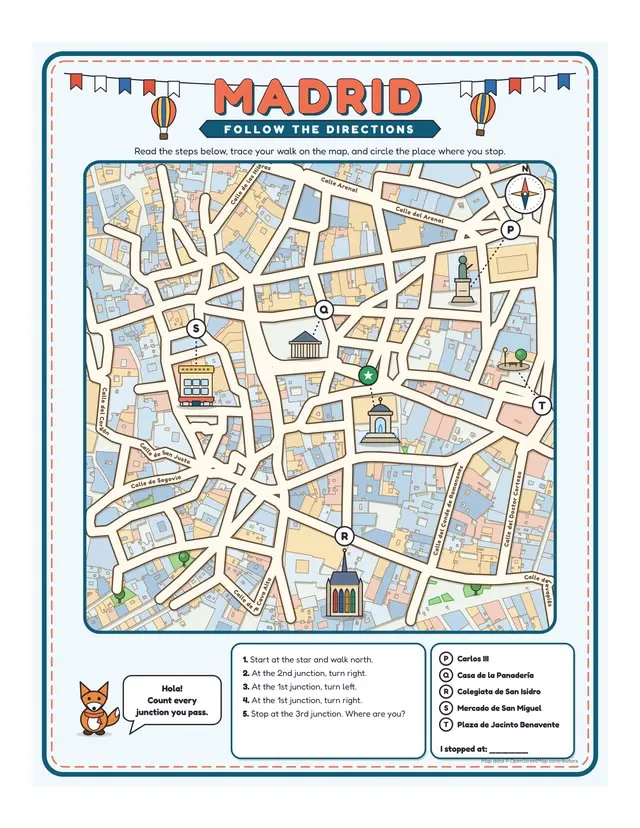
Follow the Directions: Count the Junctions
This page gives the child turn-by-turn directions: count the junctions, turn left or right, and find where you end up.
It builds map-reading skills, which is a useful selling point for parents. One note: London doesn’t have this page type, according to the vendor.
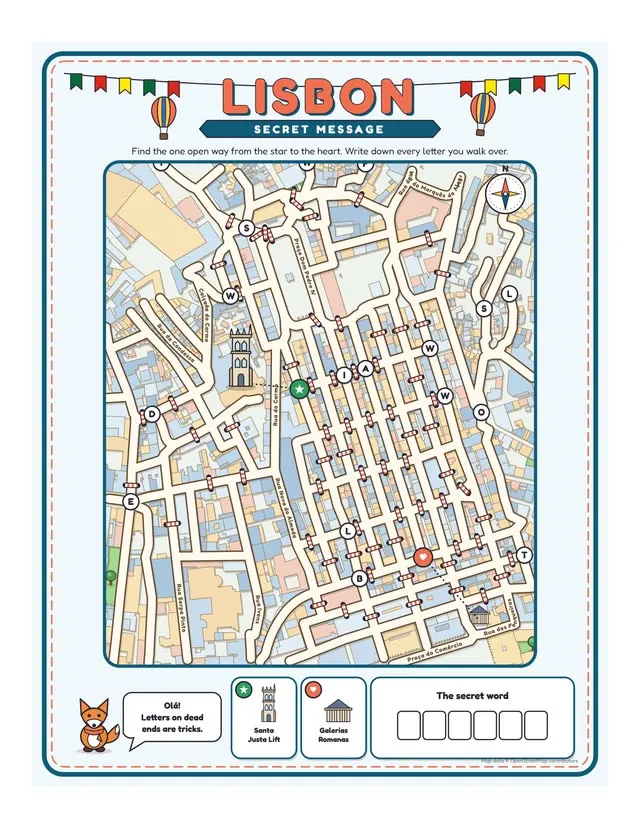
Secret Message: Collect Letters Along the Route
Kids collect letters along a route to reveal a hidden message. It’s a puzzle with a payoff, which keeps younger solvers going.
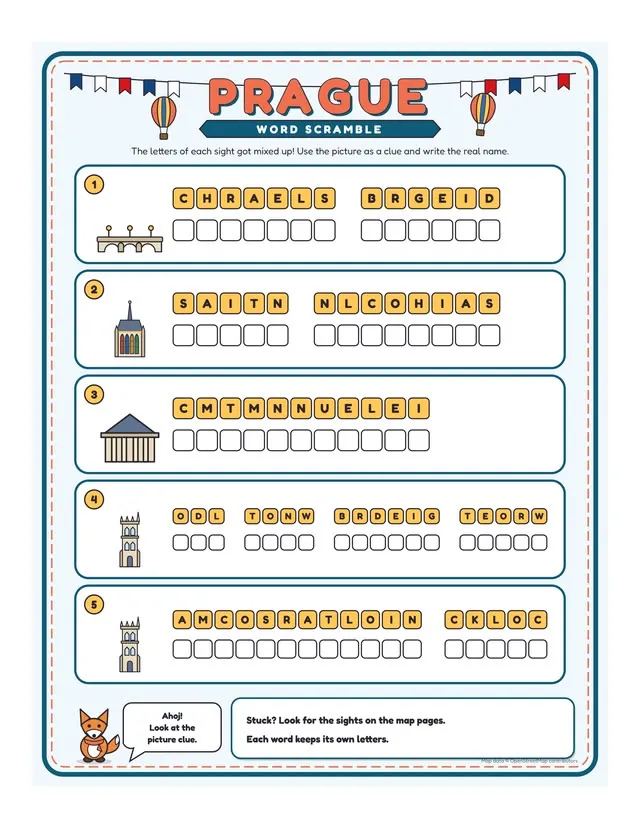
Word Scramble: Untangle the Names of the Sights
The word scramble mixes up the names of the city’s sights for the child to untangle. It’s a quieter page that breaks up the map puzzles.
Answer Pages Drawn for You: No Solving by Hand
Here’s one of the biggest advantages of TripDoodle. Every puzzle comes with its answer page already drawn and solved, so you don’t check routes by hand.
The answers sit at the back of the book, which is what parents expect from an activity book.
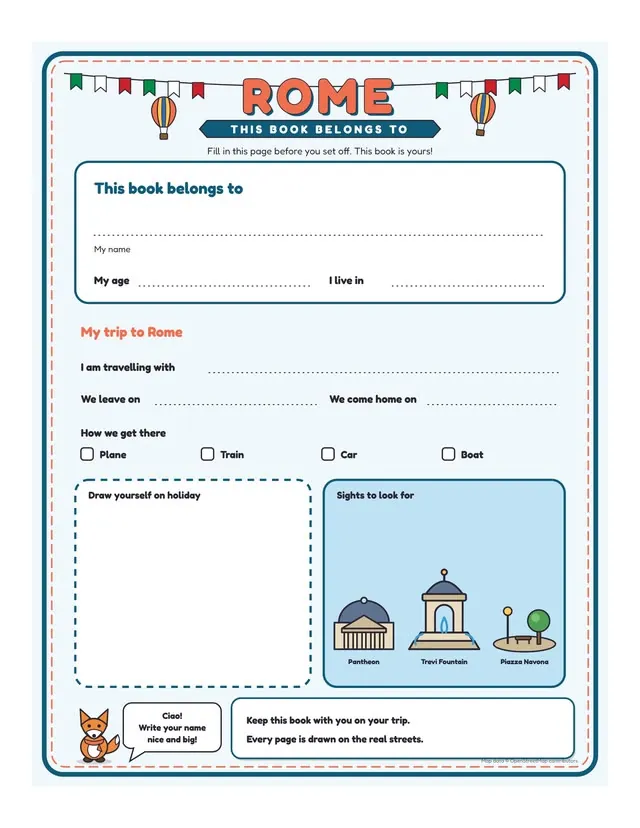
Keepsake Pages: Name Page, Packing List and Explorer Award
Starter adds three keepsake pages: a name page, a packing list and an explorer award. They turn a puzzle book into something a family keeps after the trip.
One-Press Finished Book: 29 Pages in One Go
Not sure how to order the pages? One press builds a whole book: a title page, 15 activity pages, an Answers page and 12 answer pages, 29 PDF pages in all.
You can change anything afterwards. The sales page even lets you flip through a full Rome book exactly as it was exported.
Custom Books Up to 40 Activity Pages
Prefer to choose every page? You can build the book page by page, up to 40 activity pages, and mix cities in one book if you like.
That’s handy for a “European capitals” style book. The app itself notes that Amazon KDP needs 24 pages or more.
Print-Ready PDF: 300 dpi With KDP Margins
The interior downloads as a 300 dpi PDF at 8.5 x 11 in, with the margins KDP asks for. Every page is drawn in colour; on black-and-white paper it prints in grey.
KDP Listing Text Written From Your Book
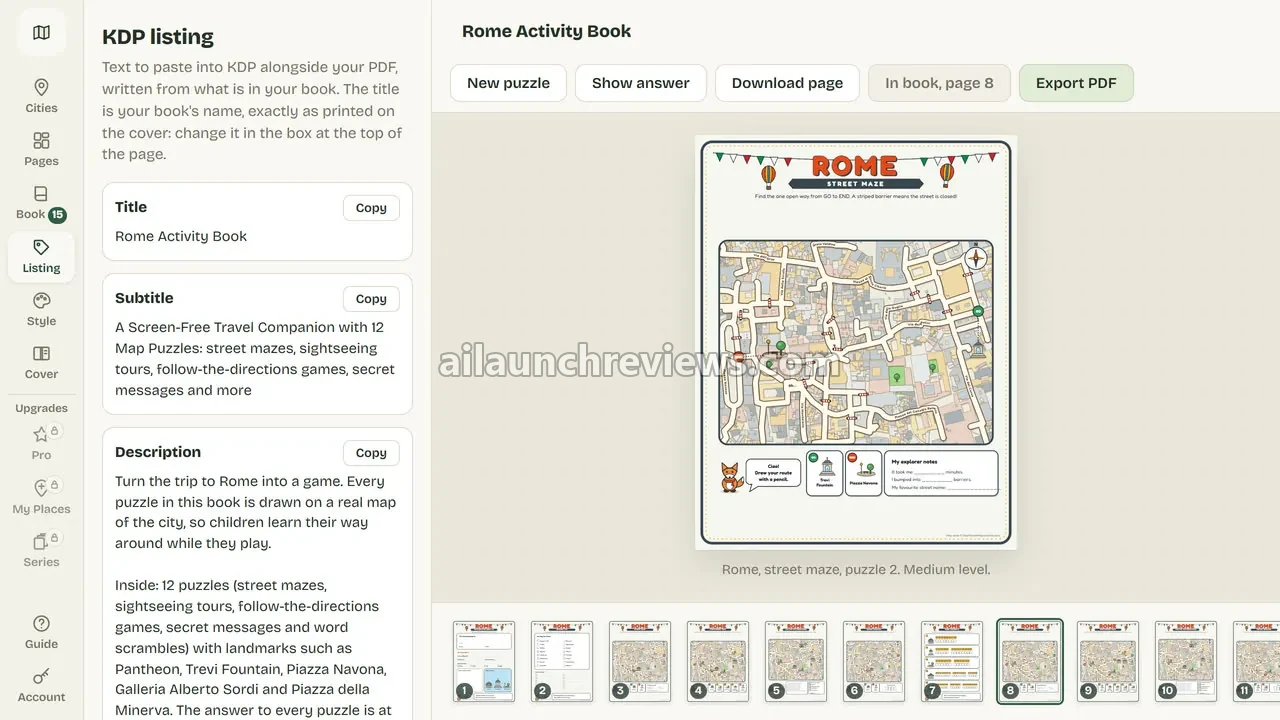
Stuck on what to write in the KDP form? TripDoodle writes a title, subtitle, description and keywords from what’s actually in your book, each with a Copy button.
You’ll still want to edit it, but it’s a solid first draft that names the real landmarks inside.
A Different Book for Each Buyer
Worried every buyer will publish the same Rome book? Puzzles are drawn from a number worked out from your account, so your one-press book isn’t the next buyer’s.
Each account also starts with one of 144 mixes of colours, character and page frame, with three colour sets to switch between.
Runs in Your Browser With No AI Credits
There’s nothing to install. The puzzles are worked out on your own computer, so there’s no AI bill and no waiting on a server.
The vendor builds and tests it in Chrome and Edge on Mac or Windows. Other current browsers and tablets can open it but are less tested.
Rights to Publish and Sell Your Books
The terms let you publish and sell the books you make, in print or as digital files, under your own name, pen names or imprint, with no royalty. What you can’t do is resell or share TripDoodle itself or your login.
Ready to try it? Grab TripDoodle through the button below. No coupon code has been announced for this launch.
TripDoodle in Action: A Complete Step-by-Step Software Walkthrough
For this walkthrough, I’ll follow the vendor’s demo and screenshots, which build a Rome activity book with a Starter account. The labels in bold are the ones shown in the app.
Phase 1: Pick a Place
Step 1: Log In With Your Emailed Details
Your account is created when the payment goes through, and the login details arrive at your checkout email. Open the login page and sign in.
Step 2: Open the Cities Panel
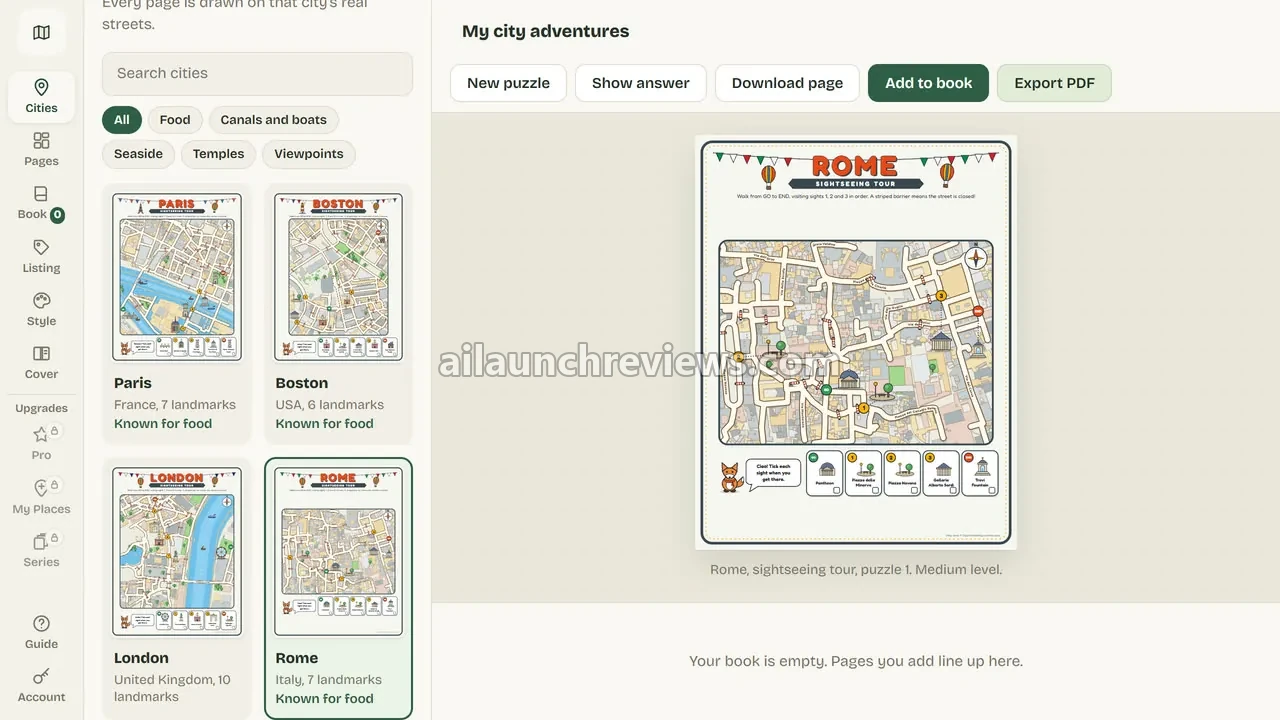
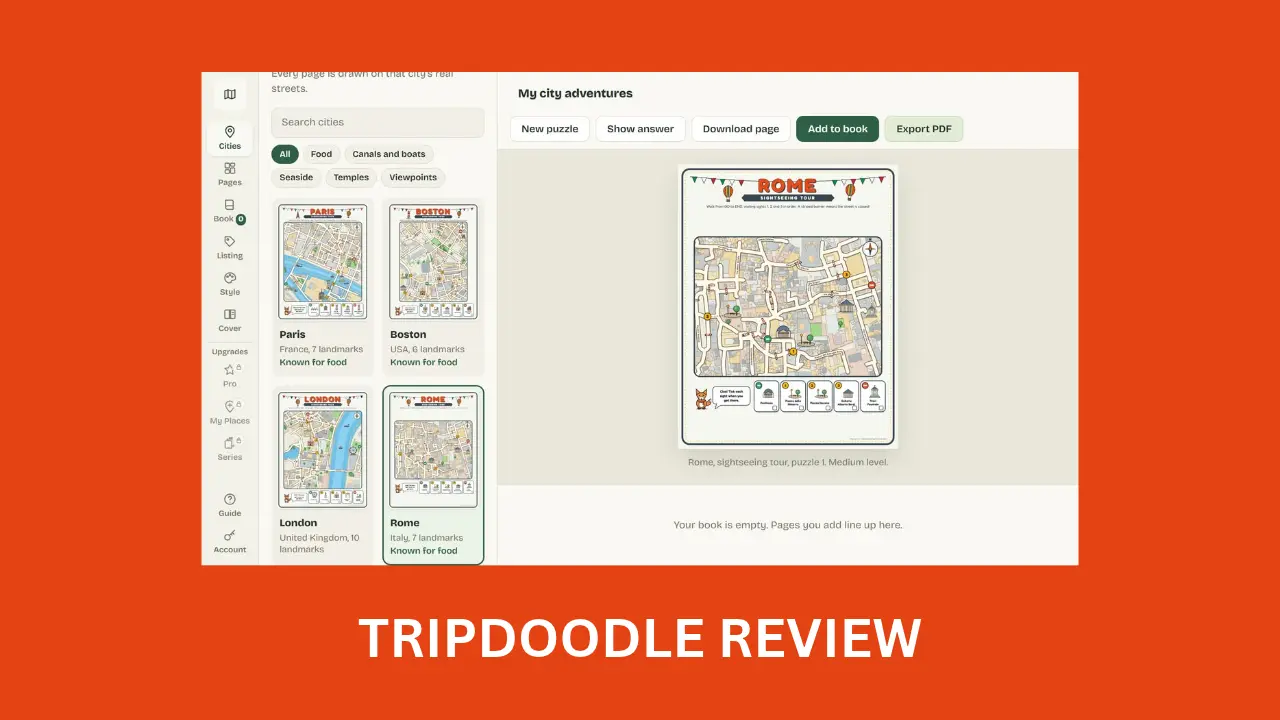
Click Cities in the left sidebar. You’ll see a card for each place, with its country and number of landmarks.
Step 3: Find Your City
Type into Search cities or scroll the cards. For this example, pick Rome, which the app lists with 7 landmarks.
Step 4: Preview a Puzzle
The selected page appears in the main area, such as the Rome sightseeing tour at medium level. Press New puzzle for a fresh layout, or Show answer to check the solution.
Phase 2: Build the Book
Step 5: Open the Book Panel
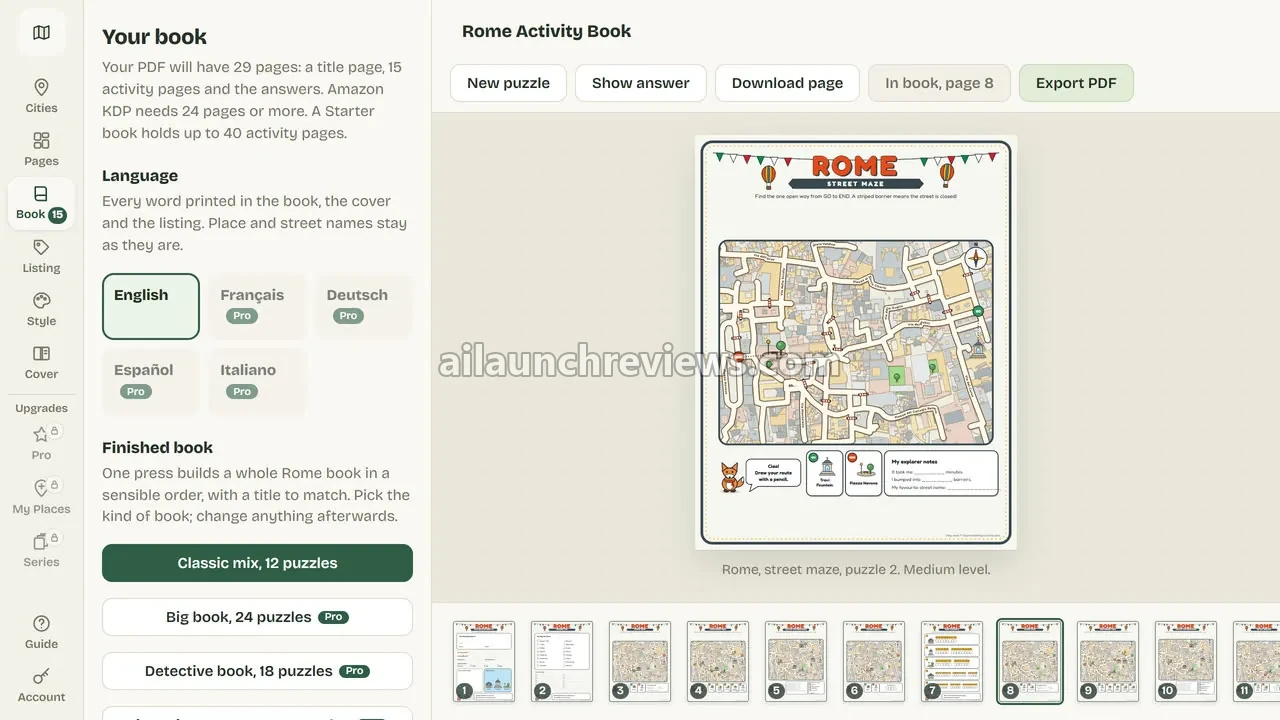
Click Book in the sidebar. The panel tells you how many pages your PDF will have and reminds you that Amazon KDP needs 24 pages or more.
Step 6: Build a Finished Book in One Press
Under the finished book options, choose Classic mix, 12 puzzles. TripDoodle builds the full Rome book in a sensible order, with a title to match.
Step 7: Check the Page Strip
The pages line up in a numbered strip along the bottom of the screen. Click any page to preview it.
Step 8: Add or Swap Pages
Want a different puzzle? Open a page, press New puzzle, then Add to book. You can grow a Starter book to 40 activity pages.
Step 9: Adjust the Look
Open Style to switch between your account’s three colour sets. Other languages and book types show a Pro label, since they belong to the upgrade.
Phase 3: Export and Publish
Step 10: Export the Interior PDF
Press Export PDF to download the interior as a 300 dpi PDF at 8.5 x 11 in.
Step 11: Copy the Listing Text
Click Listing in the sidebar. You’ll find a title, subtitle and description written from your book, each with a Copy button, plus keywords for the KDP form.
Step 12: Edit the Listing to Fit Your Brand
Read the text and adjust it. The title is printed in the book, so change it in the box at the top of the page if you want a different name.
Step 13: Make a Cover
Starter doesn’t make covers. Use KDP’s free Cover Creator, or buy the Pro upgrade for a full-wrap cover.
Step 14: Upload to KDP Yourself
Create the paperback in your own KDP account, upload the PDF and cover, and paste in the listing text. KDP reviews every book before it goes live.
Step 15: Back Up Your Files
Books and settings are saved in your browser, on the computer you made them on. Keep the PDF files you download so a cleared browser doesn’t cost you your work.
For more details, watch the demo video below:
Why Should You Consider Using TripDoodle?
Here are 3 reasons why I believe TripDoodle could be a valuable addition to your KDP publishing:
It Gives You a Fresh Angle in a Crowded Niche
Activity book generators usually make the same grids as everyone else. TripDoodle draws on real maps of 20 cities, with five puzzle types and an answer page for each.
What I like here is the simple pitch for buyers: the city is in the puzzle, not only in the title.
It Cuts Book Building to Minutes
Drawing one map puzzle by hand can take hours, plus the answer page. TripDoodle builds a 29-page book in one press and writes the listing text for you.
What I like here is that the time saved goes into covers, keywords and marketing, where it matters for sales.
It's a One-Time Cost With No Credits
Starter is $17, one payment, with no subscription, no per-page fee and no limit on how many books you make. There’s no AI service behind it, so there’s nothing to top up.
What I like here is the predictable cost: your 20th book costs the same as your first, which is nothing extra.
Who Is TripDoodle Best For?
TripDoodle is a great fit for:
- KDP low-content publishers: you make puzzle, activity or children’s books and want pages that aren’t the usual grids.
- Owners of maze or word-search generators: you want a different kind of page for your catalogue.
- Travel bloggers: you’d like a companion book for the cities you already write about.
- Family travel publishers: you sell to parents planning trips with kids aged 7 to 9.
- Series builders: you want a matching book for each of 20 cities.
- Local publishers: with My Places, you can make a book for a town that has no children’s book yet.
TripDoodle may not suit:
- Buyers who want colouring books: it makes puzzle and keepsake pages, not colouring pages.
- Tablet-only users: it’s built and tested for Chrome and Edge on a computer.
- Anyone expecting done-for-you income: you still publish, design covers and market every book yourself.
TripDoodle Pricing Breakdown: Front-End, OTOs and Coupon
Front-End Price
TripDoodle Starter is available for just $17 (one-time payment), with no monthly subscription required.
Let’s see exactly what’s included in this package: 20 cities, eight page types (seven in London), a one-press book with twelve puzzles and their answers, books up to 40 activity pages, a 300 dpi PDF at 8.5 x 11 in with KDP margins, KDP listing text, and the right to publish and sell the books you make.
Compare that with hiring an illustrator to draw even one custom map puzzle, or spending hours drawing it yourself. Here, $17 covers every book you make from 20 cities.
The vendor hasn’t announced a price increase or a deadline for this launch.
Every package has a 30-day money-back guarantee. Ask within 30 days of your purchase by emailing the vendor, and you get the full price of that package back. A refund removes that package from your account.
No coupon code has been announced for this launch.
Click the button below to access the main sales page:
TripDoodle OTO Breakdown
Here’s every upgrade in the funnel, in order. According to the vendor, there’s no order bump and no downsell, and each upgrade appears once with a No thanks link.
OTO 1: TripDoodle Pro ($47 One-Time)
Price: $47 (one-time payment)
Pro opens the whole library of 322 places in 78 countries and territories, from Kyoto to Cusco, plus fifteen more page types. It pays for itself the moment you want a cover, a different age range, or more than 20 cities.
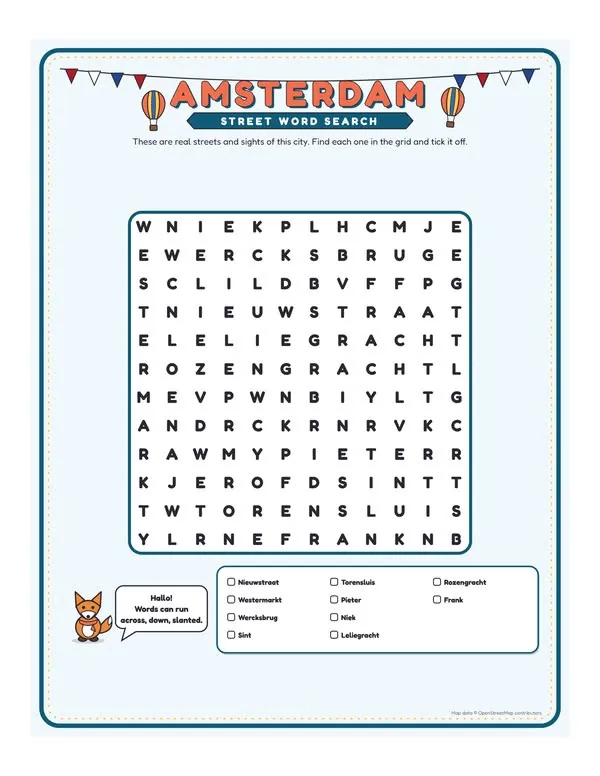
Here’s what you’ll unlock with this upgrade: word search, spot the difference, picture sudoku, secret code, which path, grid hunt, close-ups, map detective, food trail, boat maze, viewpoint hunt, I-spy bingo, passport stamp, local words and travel diary pages; three levels (easy for ages 5 to 7, medium for 7 to 9, hard for 9 and up); six kinds of one-press book, from a 24-puzzle big book to a 10-puzzle weekend book; a full-wrap cover with back, spine and front in four designs; five book sizes; five languages; 8 colour sets, 6 characters and 3 page frames with your publisher name and logo; nine A+ content pictures; and one ZIP with interior, cover and listing text.
Two caveats from the vendor: not every place has every page type, and the French, German, Spanish and Italian translations haven’t had a native review yet.
Who needs it: anyone publishing more than a handful of books, or who wants covers and age levels. Who can skip it: testers happy with 20 cities and KDP’s free Cover Creator.
OTO 2: TripDoodle My Places ($67 One-Time)
Price: $67 (one-time payment)
My Places lets you make a book for a town nobody else has. You export a map file of a town centre or neighbourhood, about 1 km across, from the free Export button on openstreetmap.org, and TripDoodle turns it into a place.
Here’s what you’ll unlock with this upgrade: no limit on the number of places; framing tools to slide and resize the map window, tick five to eight landmarks, rename them and pick a drawing for each; the same puzzles and keepsake pages as library places; and new versions of library places by zooming into part of their map. The map file is read on your own computer and isn’t uploaded anywhere.
What it needs: enough streets in the window and at least five named landmarks. Your own places don’t get the food trail, boat maze or viewpoint hunt, or lakes and the sea.
Who needs it: local publishers and travel bloggers targeting towns with no kids’ book yet. Who can skip it: anyone happy with the built-in library.
OTO 3: TripDoodle Series Studio ($37 One-Time)
Price: $37 (one-time payment)
Series Studio plans a series once and exports every book in one run. It pays for itself when you’re publishing the same format across many cities.
Here’s what you’ll unlock with this upgrade: recipes that set the page order for every book; a place picker that includes your own places; a one-run export with one folder per book holding interior.pdf, cover.pdf and listing.txt (or one ZIP per book outside Chrome and Edge); matching titles from a pattern such as “{place} Activity Book for Kids”; a series line on the cover and title page and a last page listing up to 18 other books in the series; a CSV upload sheet with one row per book; and the option of one collection book of all ticked places.
With Starter alone, a series uses the 20 Starter cities and has no cover.pdf. It doesn’t upload to KDP for you; you still upload each book.
Who needs it: publishers building 10 or more matching titles. Who can skip it: anyone making a few books by hand.
Front-end plus every upgrade comes to $168 ($17 + $47 + $67 + $37).
Which Plan Should You Pick?
Start with TripDoodle Starter at $17 if you want to test the niche with a few city books and KDP’s free Cover Creator. Pro at $47 is the upgrade most publishers will want, since it adds covers, age levels and 322 places. Add Series Studio if you plan a long run of matching titles, and My Places only if you have specific towns in mind that aren’t in the library.
Can You Really Make Money With TripDoodle?
Yes, but the software won’t bring you customers or guarantee income on its own. The vendor makes no income claims: what your books earn depends on your niche, your listing and your patience.
Publish City Activity Books on Amazon KDP
Who pays: parents and grandparents buying a book before a family trip. You build an interior for each city, add a cover and publish it on KDP under your own imprint. Price it against similar kids’ travel activity books in your target market. Expect an hour or two per book once you know the workflow, mostly on the cover and listing.
Build a Matching City Series
Who pays: buyers who like one book and look for the next city. With Pro and Series Studio, you plan one recipe and export matching books with a series line and a list of the other titles. Price the series consistently so it looks like a set. The effort goes into keywords and covers for each title.
Make Books for Towns With No Kids' Book Yet
Who pays: families visiting smaller towns, and local shops looking for souvenirs. With My Places, you turn a town centre map into a book that no one else on Amazon has. The terms let you sell the books anywhere that prints from a PDF, so you can sell print copies locally too. This takes more setup, since each map needs framing and named landmarks.
Add a Companion Book to a Travel Blog
Who pays: readers of your travel blog or newsletter. You publish a book for each city you cover and link to it from your guides. Set the price like any other kids’ activity book. The effort is small if you already have the traffic.
What I Love About TripDoodle (And What I'd Improve)
PROS:
- Real Map Puzzles: every puzzle is drawn on the actual streets of the city.
- Answer Pages Included: each puzzle comes with its solved answer page.
- One-Press Books: a 29-page book builds in one press.
- KDP-Ready Output: 300 dpi PDF at 8.5 x 11 in with KDP margins.
- Listing Text: title, subtitle, description and keywords written from your book.
- No AI Credits: puzzles are worked out on your own computer.
- Unique Per Account: puzzles and looks vary by account.
- No Book Limit: no per-page fee and no cap on books.
- Clear Rights: you can publish and sell your books with no royalty.
- Honest Sales Pages: real sample pages, a 29-page flipbook and no income claims.
- 30-Day Guarantee: every package has its own 30-day refund window.
CONS:
- No Cover in Starter: you need KDP’s Cover Creator or the $47 Pro upgrade.
- One Age Level in Starter: only medium puzzles for ages 7 to 9; easy and hard need Pro.
- Work Saved in the Browser: books and settings stay on one computer and vanish if you clear browser data.
- Best on Chrome and Edge: other browsers and tablets are less tested.
- Unreviewed Translations: Pro’s four extra languages haven’t had a native review yet.
- No Colouring Pages: pages are drawn in colour and print in grey on black-and-white paper.
TripDoodle FAQ
1. Do I need design skills to use TripDoodle?
No. You pick a place and the pages, and TripDoodle draws them and works out the answers.
2. Is TripDoodle cloud-based or installed?
Not installed. It runs in your browser, but the puzzles are worked out on your own computer and your books are saved in that browser.
3. Does TripDoodle use AI or credits?
No. It uses no AI service, so there are no credits to buy and no monthly fees.
4. Do I need the OTOs?
No. Starter makes and exports finished books on its own. Pro adds covers, 322 places and age levels if you want them.
5. Can I sell the books I make?
Yes. You can publish and sell them on Amazon KDP or anywhere that prints from a PDF, under your own name or imprint, with no royalty.
6. Am I allowed to print these maps?
Yes. OpenStreetMap allows commercial use with a credit, and TripDoodle prints the credit line in your book; leave it in.
7. Does TripDoodle make the cover?
Not in Starter. Use KDP’s free Cover Creator, or the Pro upgrade for a full-wrap cover in four designs.
8. Does it work on a Mac, Chromebook or tablet?
Not necessarily. It’s built and tested in Chrome and Edge on Mac or Windows computers; other browsers and tablets can open it but are less tested.
9. Can I resell TripDoodle itself?
No. The terms give you a personal licence, so you can’t resell or share the tool or your login.
10. Is there support and a refund policy?
Yes. Support is by email at longvu271205@gmail.com with replies aimed within two business days, and every package has a 30-day money-back guarantee.
My Final Verdict on TripDoodle
Overall, I believe TripDoodle is worth considering, especially if you publish kids’ activity books on KDP and want pages that aren’t the same grids everyone else uses. That’s the main takeaway of this TripDoodle review.
Start with Starter at $17 to test a few city books. If the niche works for you, Pro at $47 is the sensible next step for covers, age levels and 322 places, with Series Studio and My Places for publishers scaling up. If you’re designing covers yourself, my guide to graphic design software covers tools that can help.
One honest caveat: this review is based on the vendor’s sales page, JV page, sample pages and demo video, not hands-on use. Of course, the software won’t automatically bring you customers or guarantee income; KDP reviews every book, and sales depend on your listings and marketing.
CLAIM YOUR EXCLUSIVE BONUSES IN 3 SIMPLE STEPS
Step 1: Purchase the TripDoodle directly from my website.
Step 2: Once your purchase is complete, forward your receipt to: bonus.samxavier@gmail.com
Step 3 (Final): Sit back and relax! You’ll receive all your bonuses within 24 hours, guaranteed.
Thanks for reading my TripDoodle Review. Wishing you and your family continued success and prosperity!